
One of the many things we see trending in the videogame world these days are gaming headsets. Whether you lack the space or funds for a full surround sound system or you just need to play quietly, gaming headsets are probably your best solution. To clarify, when we say gaming headsets, we mean a full surround sound headset that transmits not just the voice of your teammates during online play, but also the sounds from the game itself. Occasionally, you’ll even stumble across people like me that have a perfectly capable multi-channel surround sound solution but still opt for the cans.
[boxout]For those people, the Turtle Beach PX5 is now one of your options. Up to this point, Turtle Beach’s flagship console offering has been the X4, which eventually evolved in to the X41. Unfortunately, they were intended primarily for the Xbox 360 and came with numerous technical flaws, not to mention a questionable design.We’re happy to report that the PX5’s seem to have completely rectified the issues that marred previous iterations. For starters, the PX5 was built without the 360 or the PS3 being left wanting certain features. They work amazingly well with both consoles and although the box states that they were built for the PS3, full functionality remained no matter which platform we paired them with.
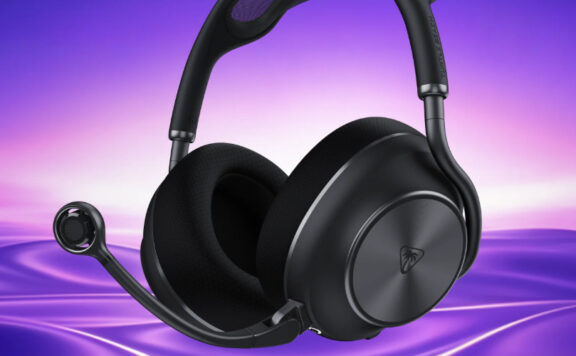
Perhaps the biggest issue we had with the X4-line was comfort. They felt like they were made entirely of plastic and their tiny ear cups kept them from blocking out all external noise. The PX5’s build quality is noticeably higher and they actually have a much more professional design and feel to them. The ear cups are the perfect size, even for gamers with bigger ears, and the fabric the cups are made of is extremely comfortable, allowing for adequate ventilation without permitting too much ambient noise.
When it comes to sound, the PX5’s are also a step up from preceding models. The Full 7.1 surround sound is nice and crisp; really immersing you in the game. There were instances where the highest of highs would distort just a touch but we could only duplicate it when we had the headset turned up beyond a reasonable volume. If we were being extremely picky, we could also complain about a lack of low end punch but the bass is still plentiful enough to keep it on par with most of the competition.
Build quality is noticeably high
Moving on to functionality, the PX5 easily takes the lead over its competition. The extra bells and whistles included out of the box almost put it in a league of its own. It has 9 different sound presets built in to the headset that range from giving you the ability to boost treble and bass, or even small ambient noises that allow you to hear every tiny detail. One of the presets is built specifically for hearing the footsteps of enemy players in online matches, which definitely gave us a leg-up during the games we played while testing.
It doesn’t stop there though; at some point in the future, Turtle Beach will be releasing a fully customizable EQ for the PX5 that can be configured on your computer and then transferred to the headset via a USB cable. Not only that, but developers can even fine tune an EQ just for a certain game and make it available for download via the Turtle Beach website. At the time of this article, the only developer that had done it was Visceral for Dead Space 2, but more of them are sure to jump on board as time passes. The hub you’ll use to do this on your PC is already downloadable via turtlebeach.com and although it’s pretty basic, it’s also easy to use.
Chatting with friends and teammates has never been easier than it is with the PX5. A microphone that’s very flexible and can be moved to any position makes communication stress-free, but perhaps even more useful is the chat feedback system. Chat feedback isn’t new to the PX5 but it’s such a beneficial feature that it still deserves a mention. The feedback comes straight from your mic and goes back in to your own speakers, keeping you constantly aware of how loud you’re speaking which cuts down how much screaming occurs during a match. You can even adjust the feedback, or turn it off altogether via the PX5 hub on your PC. You can also adjust the pitch and volume of your voice, as well that of other players.
Another neat addition to the PX5 is Bluetooth integration. This allows you to not only wirelessly pair it with the PS3 for in-game chat purposes but you can also pair it with mobile phones. We tested taking calls and streaming music from our phones while gaming and it worked flawlessly. The Bluetooth volume can be adjusted independently from the game sound and there’s even an outgoing mute button built straight on to the side of the headset.
One of the finest headsets we’ve ever tested
The PX5 uses RF to transmit its signal but Turtle Beach has fine-tuned it so interference is seldom an issue. We even tested putting the base unit right next to a wireless router and still rarely had problems. Speaking of the base unit, it’s also top notch. Perhaps its best quality is that it’s powered via USB so there’s no need to worry about finding an empty wall outlet for it. It also includes an optical bypass so if you still require the use of a receiver from time to time, you can utilize both, without having to swap around cables. The only thing it’s lacking that we would’ve liked is multiple optical inputs for those of us that own both the PS3 and 360. With only one input, you have to change cables to go back and forth.
By now, you’re probably thinking that properly setting everything up must be a real pain. You would be wrong. We thought the same thing before using them but upon swapping settings around and figuring out what every button does, we were greeted with a voice, rather than a sequence of beeps. She’s pleasant, she tells you exactly what each button does as you press it and she’ll even tell you when your batteries are getting low. As small it sounds, this lovely vocal addition ended up being the glue that held all the features together.
At the end of the day, the Turtle Beach PX5 is one of the finest all-inclusive gaming headsets we’ve ever tested. It sounds great, it has every function you could possibly imagine and while the price may scare some people away, we can honestly say that it’s worth every penny. A good headset can potentially change the way you hear games and for us, there’s no better option on the market right now.




hazelam
i’d like a decent set of headphones, but i couldn’t ever see myself spending 200 quid on a pair, even with a mike and bluetooth capability.
i bet they sound bloody good though.
Deathbrin
Any idea if they are any comparable with Sennheiser lower audiophile line (5xx) headphones? I’d love 7.1 surround and it would be hardly comfortable to wear _both_ headphones and some headset, but i don’t want to miss out on the sound/music quality. Any good?
Matt W [Echo]
I’m actually unfamiliar with Sennheiser. The problem with most headsets that weren’t intentionally built for console games is that they rarely work by themselves. You need some kind of amp to properly utilize them. If you’re looking for a complete set that works straight out of the box, you really can’t go wrong with the PX5’s, the Tritton AXPro/720’s, or the Astro A30/A40 with the Astro mixamp. They’re all good headsets.
Deathbrin
Thanks. :)
colmshan1990
As much as I would love a surround sound headset, this price is far too much.
What’s the cheapest I could get?
Matt W [Echo]
You can find good gaming stereo headsets for around £50 or maybe even less.
cam the man
They sound just the job, but as I’ve already got surround sound I can’t justify spending £200 on them.
A2J7C
I just bought my PX21’s and they are greate for the price that i’ve payed (63€) it work’s well on the PS3, i don’t have one Xbox :/ Bu i’ve seen these PX5, but it’s just too mutch for one gaming Headset…
Jimster71
I’ve recently bought an Astro wireless Mixamp and some Sennheiser PC360s – another really good combination that works on both consoles.
Matt W [Echo]
Yeah, those Astro mixamps are top notch.
JesseDeya
I’m so glad I’ll be in the US in 24hrs, these are already released over there and I can get them for $250USD ($240AUD or £155).
I’ve currently got some Tritton AXPros, but the microphone attachment is too fragile and the right sub has problems, these PX5s look exactly like what I’m after!
Matt W [Echo]
I used the AXPro’s for a long time and while they were a good headset, they don’t really compare to the PX5, all things considered.
JesseDeya
Good to know, thanks Matt!
JesseDeya
Whelp, that didn’t take long. A trip down the local JB Hifi and a little big of bargaining (bringing them closer to the US $250 price) and I’m now the proud owner of some PX5s :)
It look me a while to pair up the bluetooth (because the instructions are WRONG!) but once done it’s all good. Nice how you can dual pair, that’s going to come in very handy when I’m on call but want to play PS3!
Overall I’m very happy with these so far, and the reservations I used to have about wireless headsets is all but gone – for PS3 gaming these sound just fantastic.
Awayze
Will these work on an iPhone 4 to stream music to them?
I was going to spend £220 on Dr Dre Beats Studio HD but these would work with PS3 and i4?
Matt W [Echo]
Yep, as long as your iPhone has bluetooth, you can use it for calls and media. The most common thing I used it for was streaming internet radio while I played a passive game, such as poker. You can also plug the headphones in directly for better audio quality, but you’ll need to purchase an auxiliary headphone cable.
Deathbrin
Ohh, that’s what you should’ve mentioned there! Nice. :)
clank250
I’ve actually just ordered in the Psyko Carbons for me. I realized I need a better headset for my PC, and the Pyskos were great when I saw them at my comic-con last year. I know they don’t work with my PS3, but I’m not too concerned, my Playstation Offcial Headset works just fine for my Playstation uses.
zb100
Vogue.