
If you suffer the embarrassment of having a small disc, and a regularly teased by your friends who have huge discs, then your prayers have been answered. PlayStation 4 Firmware 4.5, which is about to go in to beta, will support external hard drives.
You will be able to connect a USB 3.0 external hard drive up to 8TB, and you can use it for everything, and yes, that include game installs. You can also move games currently installed on your PS4 hard drive to the external drive.
If you’re a PSVR owner then 4.5 will bring another new feature, you will also be able use your PS4 to play 3D Blu-ray discs and watch them in 3D on the headset. The Quick Menu is also getting a refresh, and you can set custom backdrops using screenshots.
Sony say they will reveal a release date in the next few weeks.
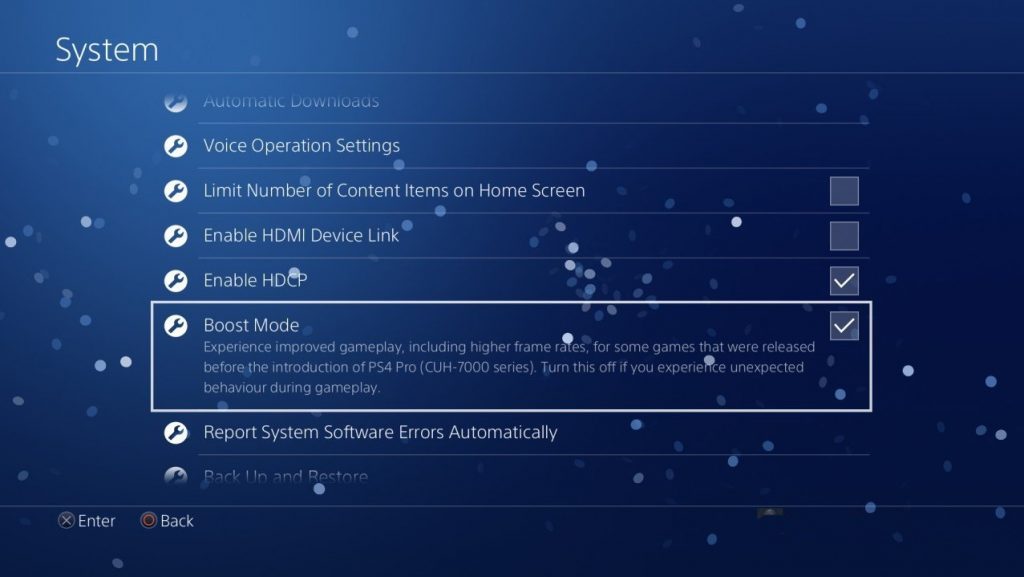
UPDATE: As spotted by NeoGAF, 4.5 also includes a “boost mode” for those with a PS4 Pro. It is appears that standard PS4 games with a variable frame rate would be more stable, although if a frame rate is locked it would not improve the game above the lock. For example a game locked to 30fps but dips down to 20fps in some situations would be improved, but the frame rate would never exceed 30fps.





ron_mcphatty
Nice, hopefully accessing media externally will come soon too, I know there’s a million ways to do it these days but I really liked having holiday photos and videos sat on my PS3.
So I’ve just gotten a firmware beta code, before I use it so you guys reckon it’s safe enough to do so? There were so many horror stories last gen about firmware bricking their consoles, I know it’s mostly bullshite but if there’s any risk anymore I’d rather not bother.
DividSmythe
Well done on getting in the Beta you lucky so-and-so. I’ve been in the last few beers tests for firmware and not really had a problem but when I went back to an old firmware update (to use remote play) it deleted all my patches.
DividSmythe
Not beer tests *beta tests.
ron_mcphatty
Wish I’d gotten a code for beer testing instead! No remote play would be an arse, I use that a lot, is it always disabled in the betas? If so I’ll not bother, probably shouldn’t have redeemed my code what a waste eh.
DividSmythe
From memory I’m pretty sure the last 2 have been. It will tell you quite early in applying the update that its about to disabled remote play. Have a look in the update notes. Is the best bet. Even if you download it you don’t have to apply it, I think.
ron_mcphatty
Cheers for the advice mate that’s good to know!
DividSmythe
No problem buddy. I’m glad to help.
TSBonyman
I didn’t get a beta code this time either :( Damn all those new PS4 sales must be thinning the odds of getting in! :) I’ve never had any real bother with them except the odd game crashing, which is partly what the beta is testing for anyway.
You can browse/play media from a USB device using the PS4 Media Player, no?
But all that media playback was much slicker on PS3. I loved that slideshow where it scattered your photos across the screen in sequence, with your choice of music playing in the background. Shame it’s not on PS4 too.
MrYd
They don’t send out all the beta invites at once. Some got them today, but if you didn’t you might get one in a few days. Or any time between now and when it’s ready to leave beta.
TSBonyman
I forgot about that .. *checks inbox* … *checks inbox*…
;)
Andrewww
Agree, media playback was and for me still is still working better on the PS3. My PS4 doesn’t even recognise my media server being connected, while my PS3 happily plays movies from it.
And listening to my Spotify music on the PS4 is also quite awkward, as it plays on even if I start a game and of course would need to hear the game sounds, but they’re muted. Maybe I’ve not found the respective setting, but do they really not have any usability guys at Sony..?
freezebug2
“Please turn it off when unexpected action occurs during gameplay” put in simple layman’s terms “Switch it off, bang it on the side then switch it on again!” lol
Cracking update to the firmware, I can imagine that moving all of the seldom used but not marked ready for deletion games from internal to external drives could alleviate strain and possibly speed up the internal workings of the omnipresent parallelogram!
Jag
Yay for 3D blu ray support on PSVR, I’m definitely looking forward to trying that out!
Hopefully they’ll add support for 3D games too as surprisingly there are some games that support it on PS4 like Zen Pinball and Sniper Elite 3.
Demibeard
Zen Pinball recognises the 3D display and works, but the effect didn’t seem as good as the TV with glasses to me.
Nice to have though.
Jag
I didn’t realise that. Thanks for the heads up, I’ll have to experiment and see what else works.
stonyk
Think I might use this as discussed above. To put all my games on there and regularly update without needing to wait days when reinserting in future.
Main question is what is the effect on speed to play games from the external hdd? Might be put of if loads time triple for example.
MrYd
In theory, it shouldn’t make any difference. The drive in the PS4 connects to a Sata2 connector (which all the drives have), but apparently then uses the USB bus to talk to the PS4. And USB3.0 is faster than Sata2 anyway (5Gb/s vs 3GB/s)
So there shouldn’t be any problem at all.
Stefan L
PS4 has SATA 3, which is 6Gbps. However spinning discs come nowhere near to saturating SATA 2, let alone USB 3 or SATA 3. An SSD would, but then that’s fast enough that it wouldn’t really matter.
Sammy
Unfortunately the SATA 3 in PS4 doesn’t perform like SATA 3 should (not in regular PS4 and not in PS4 Pro). There is a bottleneck there somewhere which is why a SSD drive is not as big of an improvement as it should. USB disk will probably have exactly the same performance as an internal one (even with SSD).
bunimomike
Agreed. Tests show that if you’re after speed increases, a decent hybrid drive is the way to go if you want to be even remotely sensible with money.
kjkg
Just got in to the beta, will try it out this weekend. Happy with this though.
Andrewww
Doesn’t sound like there’s any interesting features this time around for me, as I’ve installed an internal 2TB drive already. But I just got a mail with a beta code so will try it out.
As in the past it’s always been a pain connecting any drive to a PS3/4, as it always required some odd format nobody else ever used (FAT?), I hope they at least sorted that out finally.
bunimomike
Not sure what they’d use but it won’t be NTFS as they’d have to ask Microsoft for permission. :D
Andrewww
But it cannot be more than a couple of bucks in licensing fees, can it? Instead causing pains to all users is the wrong decision, in my view.
Severn2j
I’m pretty certain the PS4 will format the drive to the same filesystem that’s used internally, so it will be encrypted and cant be read by anything other than your PS4..
A quick google tells me the PS4 OS is based on FreeBSD 9.0, so will use a variant of one of the Unix-y filesystems (with their own customisations on top)
MOVE
Baffled that people are craving these enormous amount of storage for their ps4 games. If you buy on disc you can easily delete and re-install them when needed. On the Pro it takes 15 seconds to install 37 gb of Dishonored 2!
MrYd
You’re forgetting about all the updates, which can take a lot more than 15 seconds to download. And what about all those games you might have downloaded because of PS+ or some of Sony’s sales?
MOVE
@MrYd
But why do people need to have everything available all the time? My 1 tb is sufficient and it’s not like I don’t buy games enough. Besides, why don’t they just download stuff overnight while the console is in rest mode?
MrYd
You’ve never sat there and thought “I really fancy a game of [something I deleted ages ago] right now”?
You _could_ wait for it to download, or leave it overnight, but when there’s an obvious solution they’ve finally implemented, why would you?
MOVE
“You’ve never sat there and thought “I really fancy a game of [something I deleted ages ago] right now”?”
Sure but it’s not a big problem. I simply don’t understand the impatience or modern day mankind.
“So there’s a good chance that after 15 seconds you can play the very start of the game again. Which you’ve probably played already. You’ll still have to wait for more to install before you can get back to where you were.”
If I reinstall a game to play it again that would be to play it from the start?
The Lone Steven
What if people don’t like doing that or have broadband that’s slow?
homerjnick
It doesn’t take 15 secs to install 37GB…it installs a tiny bit then in the background it starts to cache the game off the disk but the system storage just reports what the eventual cache will be but it takes a lot longer than the little bar you see as it installs most games.
The caching is invisible to the user.
MOVE
But that doesn’t change the fact that you can start and continue playing without any interruption after 15 seconds, so there is no “excuse” for not uninstalling and reinstalling.
MrYd
Actually, most games seem to be reasonably sensible in the order they install their data.
So there’s a good chance that after 15 seconds you can play the very start of the game again. Which you’ve probably played already. You’ll still have to wait for more to install before you can get back to where you were.
And that’s ignoring any updates. Ok, so you can probably play the game without those, but these days you run the risk of playing a broken game, and that’s assuming your save data is still compatible with the unpatched version. Which it very likely isn’t.
Sammy
I only buy digital, splitting the bill with a friend who has my account activated on their console ;)
Sammy
I only buy digital, splitting the bill with a friend who has my account activated on their console ;)
MrYd
Presumably one of those posts is for your friend then? ;)
Sammy
:D
This commenting system actually has duplicate-post prevention, spooky, huh? ;)
Sammy
I believe it’s actually ‘disk’ in case of hard/solid state drives :)
I wonder, can you move games between consoles with this external storage? As person who has 2 PS4s in two different countries (one of them having a really shitty internet), it would help me immensely to be able to just take my game-drive with me!
Also, improved framerates in old games with PS4 Pro? Wooop, wooop! I’m in!
homerjnick
Good question…will the external HD be tied to one PS4 so that plugging it into another PS4 or a PC renders it useless or will it work like external savedata does at present on USB HD where you can save savedata and see it on other PS4’s/laptop but is useless if not used by the same PSN account on the PS4?
DividSmythe
It looks like a great update for me. Only last week I was wondering what to delete next as I’ve got no room. I just need to find out which is the vest HDD to do this with on 8gbs. Boost mode for me will be great too but maybe a bit late for the rubbish Orc Slayer. That game drops to 10 frames per hour at times.
MrYd
So, anyone seen a good bargain on external drives lately? A 2TB drive will set you back £60something, and you can get a 4TB drive for twice that. Or even a 5TB drive for a little more.
I think 8TB might be going a bit far though.
Will 2TB drives drop in price much further? Or will they just become impossible to get and 3 or 4TB becomes the new cheap option?