


Oddball knows it’s weird enough that it’s literally in its name. This is a game played with a ball, but this ball can hook itself up to your phone and you can make music with it. It’s pretty odd. It’s also pretty damn cool.
Oddball – or ODD Ball if you prefer – retails for £79.99 and it comes in two main parts: the rubberised ball itself, and the app, available for iOS and Android. You’re going to have to hook those two things together via Bluetooth, and following this review I’m petitioning for all tech gadgets to go into pairing mode by bonking them off the nearest surface. Bounce the Oddball and your phone will find it straight away, and from there you can add it to your app as an input and off you go.
Once you’ve got it connected your next step is to add sounds to your sound tray. These are the different effects that you can link to the Oddball, using them to construct a track. There’s a Quickplay option here, and you can choose to preload your ball with one of nine different presets including Rock, Hip Hop, Grime, Acoustic, Disco, and Arcade. You’ve got the ability to add your own samples and vocals via the Mic In option, and then there’s a specific batch of ‘Odd’ sounds if you’re feeling like digging heavily into the ball’s unique setup with noises like zippers and police sirens to choose from.
It’s at this point that a little more of a tutorial would be useful. Your sounds are loaded into the app, and you can add more from all of the different presets, mixing and matching to your heart’s content. These then appear at the top of the recording screen, and you can scroll through them to select one. You’ve then got ten backing tracks you can play along with, or you can just use a click track to keep you in line with the beat. There’s also the option to go freestyle, but laying down further samples and tracks becomes tougher if you do.

Oddball is in essence a MIDi instrument you can chuck down the drive and not incur hundreds of pounds worth of damage – it is worth saying it’s been rated for 100,000 bounces, and not for a game of baseball. The app then is a multitracker, and you can layer track upon track as you construct your song. It’s a relatively basic multitracker; you can change the pitch of your chosen instrument, you can choose the length of the loop you want to work with, but there’s no incremental EQ here, or the ability to alter the volume of each layer of your work. That last one is currently my biggest quibble – you can put loads of work into something only to lose it all in the mix as everything is cranked up to the max.
If you go wrong with the layer you’re working on you can hit trash and start again, and you can return to a set instrument/sound later on and remove it, but if you’ve layered a couple of different loops in with the same instrument you can’t differentiate between them. The Oddball app then is very much there for quickly laying something down, and playing around with the concept, but you might brush up against the edges of it pretty quickly.
-
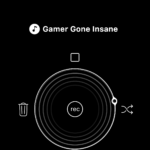
- Oddball’s main recording interface
-

- Select the different sounds for your Oddball
-
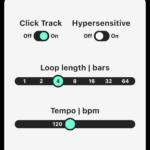
- Control your recording
It’s lucky then that you can use it elsewhere. The Oddball is a Bluetooth MIDI instrument, meaning you can use it with any DAW software – like Cubase or Garageband – that’ll accept it as an input. This opens up a world of very-real audio production, with a fun and unusual method of input. It’s cool laying down beats by clapping your hand with the ball, and you can chuck it all over the place, bang it into door frames, kick it to each other, and see what comes out the other end. It makes making music fun and engaging, and incredibly easy to pick up. If you can’t play a traditional instrument but you’ve got a head full of beats, Oddball gives you an inroad that wasn’t there before.
It’s fair to say that my children thought it was unbelievably cool, and they were able to start making their own tracks pretty quickly once I showed them how it all worked. The form factor is perfect them; it’s not too heavy that they struggled to throw it and it’s soft enough that you don’t have to worry about them doing each other any damage. The manic glee of a six-year-old set loose with a music-making ball is worth the price of entry alone.
The biggest downside? Oddball isn’t always the most precise thing to use, simply by its nature. Trying to be pinpoint accurate with it can be frustrating on occasion if you want to put a particular sound in a particular place, but it is easy enough just to try again. The fact you’ll likely opt for short loop cycles keeps that immediacy, and you’ll generally get what you want out of it soon enough. You can also add your own sounds – once again this is hilarious and/or the best thing ever – but you need the ability to trim them down so you can use them precisely, and take out the clicking and rustling you make setting the recording up.

All of that can be glossed over if you use it with separate DAW software, or you export your initial loops and tracks as a project that your friends can work on. You have the option of simply sharing it as an audio file too so you can impress your friends with something the moment you’ve finished with it.
The final oddity I experienced was that I simply couldn’t update my Oddball to the latest firmware, or at least the app makes no indication that you have done so successfully. The Oddball app also got stuck trying to perform the function, so you have to restart it. Fortunately, this didn’t affect the Oddball’s performance, but there’s clearly still a few kinks to iron out. The team behind Oddball has said that they’ll continue to roll out new features as free updates though, so it’s well worth dropping in any suggestions to them that might improve the app’s functionality.
Oddball is a weird and wonderful digital musical instrument and one that makes music creation both accessible and engaging. While there are some obvious limitations, it’s an impressive product and one that feels like it’s only going to get better with time.
