


We always love weird and wonderful gaming paraphernalia here at TSA, and this week it’s Chinese manufacturer GameSir who’ve been happy to oblige. The VX2 is a gaming keypad – about one third of a gamer’s favourite keyboard bits – and GM400 mouse combo, designed specifically for console. It’ll work with PS4, Xbox One, Switch, or PC if you’re so inclined, and if you’re a fan of FPS, MOBAs or strategy games, it has the potential to completely transform how you interact with your console. Whether you should or not is open to debate.
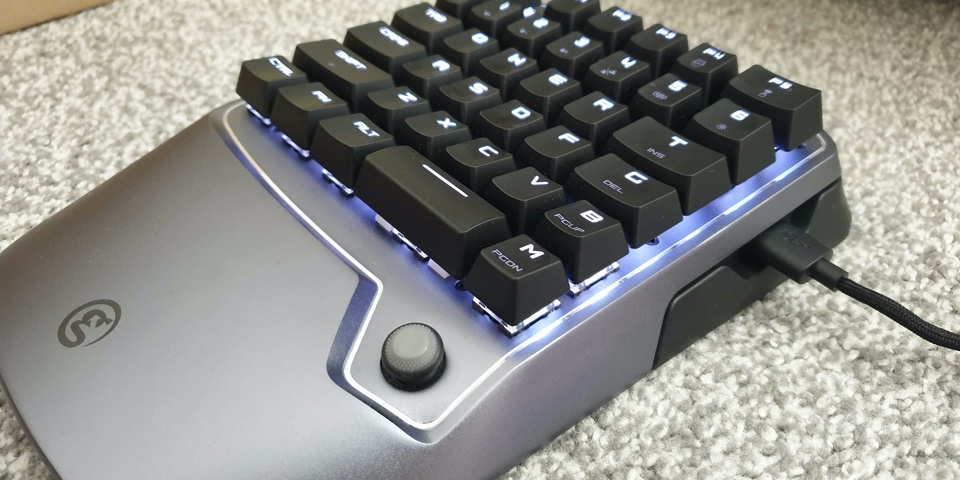
The keypad portion of the VX2 is a pleasingly hefty and well-constructed piece of kit. Framed with silver aluminium alloy over a plastic and rubber base, it feels cool to the touch and very much like a premium piece of tech when you take it out of the box. The keypad itself covers the left-hand portion of a regular keyboard, up to the 6,T,G and B keys, and it provides you with all of the main controls you’d regularly use when playing with a keyboard and mouse setup.
There’s also an analogue nub on the bottom right which gives you access to extra functionality, though I found it little trouble just to use the keyboard buttons for moving through menus. Still it’s there if you need it, and I can well imagine some people building it into the way they use the VX2.
The keys themselves house TTC red mechanical switches, and while they might not quite have the reputation that Cherry’s various offerings do, they feel quick and responsive in use. They’re also not quite as loud as their fruitier brethren, which might be a bonus for some people. GameSir have managed to stuff a decent amount of functionality onto the keypad via secondary functions for a number of buttons, and you can switch between different lighting effects, brightness, and volume.
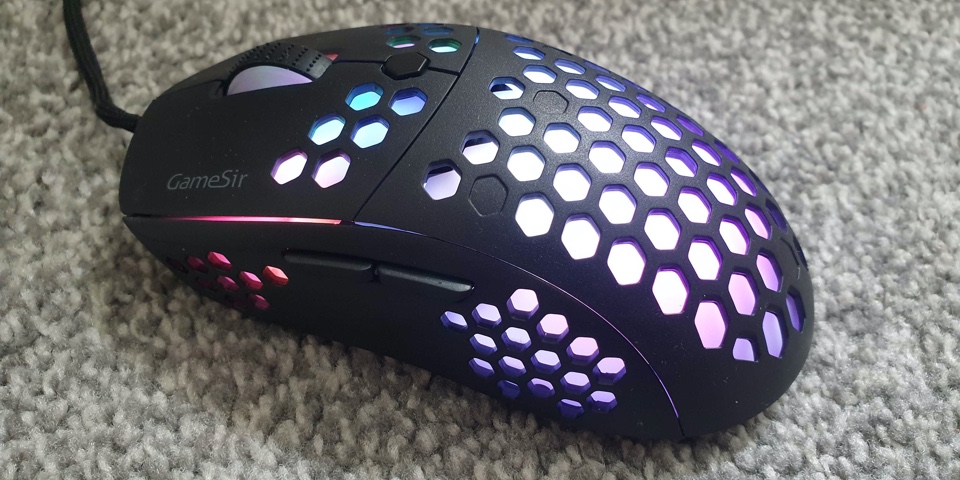
There’s a USB-C port for charging, with a full battery taking between two and three hours, and a USB-A socket too, which is where you plug in the included GM400 mouse or one of your own choosing. GameSir have gone for an ultra-light offering here, and while it’s housed in a fairly large frame, they’ve kept the weight to an absolute minimum with a honeycomb design. Under hand you’ll definitely feel the benefits, as movement feels crisp and swift.
Just as with the keypad, the mouse boasts a range of RGB lighting effects which you can cycle through via a combination of buttons on the mouse itself. The keyboard and the mouse don’t give you a huge number of lighting options to choose from, which is a little disappointing when they’ve clearly got the technology to do more, but there’s enough there that you’ll likely find something to suit your needs.
The mouse doesn’t feel as premium or as robust as the keypad does though, and if anything, they seem like two completely separate offerings. I spent some extra time with it separately on my PC, and while the main buttons feel precise and well made, the under-thumb controls and the scroll wheel do not, which certainly takes away from the keypad’s premium finish and feel. It does at least have a pretty decent sensor hidden away inside it, boasting a Pixart PMW3360 offering up to 12,000 DPI, but I think I’d be looking to upgrade it fairly swiftly after grabbing the VX2.
The bonus of the VX2 is that you can connect any mouse you see fit, including wireless ones. A Razer or ASUS mouse combined with the VX2’s keypad seems like a perfect match, but it’s a real shame that the included mouse is merely OK, when the central unit is excellent.
The VX2’s wide-ranging connectivity is certainly impressive, even if the set-up is a little on the odd side. Both PS4 and Xbox One need you to connect a standard controller to the 2.4 Ghz wireless USB dongle in order to communicate properly with the console. Presumably because it’s fooling the console into thinking you’re using a controller. Once you’ve got it all hooked up it’s a cinch to move through menus with the keyboard keys, and it all feels suitably seamless, ably assisted by the speedy wireless 1000Hz polling rate.
You’re probably already building a picture of whether the VX2 is going to interest you, but certainly in terms of playing console FPS there’s a clear advantage to be had here. Whatever you’re most comfortable with is fine, but a keyboard and mouse are simply more accurate than a controller.
The morality of having a clear leg-up over the competition isn’t one that I can truly answer, but in terms of accessibility the VX2 has the potential to open up console gaming to players who struggle with standard controllers. There are a multitude of reasons for wanting to own one, but they’re not all going to result in your dominance over all comers.

I immediately opted to test the VX2 with Overwatch and I was deeply impressed by how immediately natural everything felt, even though I was playing in my living room with a lap tray on my knee. I can’t see many people enjoying sticking the two controls on either side of them on the sofa, but with something to rest on, it just makes sense. I was definitely able to see a marked improvement in my aim, movement, and ability use, and my Torbjörn took commanding control in the rounds I played. I have to admit a feeling of guilt in doing so, mind you.
The only problem I butted up against is a lack of direct support with some games, making the whole set up feel targeted just almost exclusively at competitive shooters. Jurassic World Evolution is a game we’ve sunk many hours into on console, but I often find myself pining for the accuracy of a mouse to place all those buildings and fences. Using the GameSir in this situation didn’t translate the controls to mimic how the game works on PC, and there’s no way to customise them, making me look more like a Denis Nedry than an Alan Grant.
There is the G-Crux App that will allow you to customise some of the VX2’s button layouts, though it’s not the most user-friendly experience, starting with having to download the app from outside the Play Store, followed by the subsequent warning that it could be used to track you. That aside, you can delve into some functions, like the polling rate and sensitivity of the mouse, and access a huge number of preset button layouts and setups for some of the biggest games out there, including Fortnite and Call of Duty: Modern Warfare; you can even share your own presets with other users. It is ultimately a barebones experience though, and it once again doesn’t match up with the VX2 keypad’s excellent build quality.
