
It’s difficult to overstate the pleasure of switching the Xbox One on from standby. “Xbox: On” I say, as I walk into my living room. The menus are on screen, not quite before my backside hits the sofa but certainly before I’ve settled in comfortably. It’s fast and it’s intuitive and it doesn’t even feel prohibitively weird to be barking commands at consumer electronics after you’ve done it a few times.
The new Kinect is a big part of that process, obviously. Not only does it house the microphone that listens to your commands, it’s home to the camera that sees your face and logs you in to your Live account. If there’s more than one person present with an account on that machine, it defaults to whoever it sees holding a controller (or possibly the most frequent user? It was difficult to work out the process). If nobody has picked up the controller yet, or it’s unclear who to pick, it displays a selection screen. Smart, slick, fast and helpful.
Kinect also keeps an eye on your controller. In certain games, you can use motions with the controller to perform in-game actions, even though there are no motion sensors inside the new Xbox One controller. That’s because it beams out an IR signal that Kinect’s trio of gently glowing red spots are watching. So it works similarly to the Wii Remote and sensor bar to know roughly what your controller is doing.

That might initially seem like a gimmick but, again, it’s put to subtle and useful work by the system. If Kinect notices that your controller isn’t moving and it isn’t taking any inputs – while watching Netflix for example – the Xbox One puts it into a low-power state and conserves battery life. Another small, subtle thing that we will probably all fail to even notice in a few months but it makes the overall experience a little bit more enjoyable.
Unfortunately, it’s not all good news. The Xbox One’s menu system will be immediately familiar to anyone who uses Windows 8 or any of the variations on its tile-based system. That’s not necessarily bad but without the intuitive pointing options of a mouse or finger, it’s laborious to navigate. If you’re adamant about not using Kinect, or unable to practically rely upon it for navigation, then the home menu on Xbox One is a bit of a chore.
Compare these two scenarios. In scenario one, you walk into a room and say “Xbox: On”, pick up your TV remote and hit the on button. By the time you’ve sat down on the sofa, the menus are fading up onto the screen. “Xbox: go to Netflix.” Wait a few seconds for the app to load up your Netflix account. “Xbox: Select. Select One. Play” and now there’s an episode of Modern Family playing on my screen.
In scenario two, you walk into a room, hit the Home button on the controller and turn on your TV. Kinect is unplugged so you’re not signed in automatically – it boots to a generic, bare-bones, menu screen. It’s five button presses to get up to the “Sign in” option and sign into my account.
My personalised home screen is now loaded but I need to find Netflix. Luckily, it’s an oft-used app so I’ve already pinned it to my menu – otherwise it’s a trawl through every app I’ve installed to find the bright red Netflix tile. Pinned items are in a handy section over to the left but it’s still four button presses to start it up. Because we signed in, it knows what content to load and signs me right into my account but it’s still another two button presses to play Modern Family and that’s only so few because it happens to be the first option on my menu.
So Kinect and voice commands aren’t essential but they are definitely encouraged.
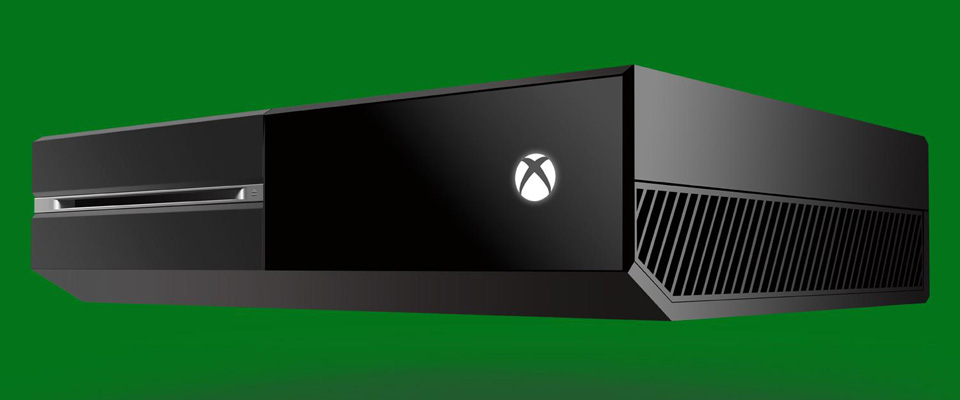
It’s full of little quirks too. If you want to watch a Blu-ray, you’ll need to download the Blu-ray Player app from the app store (it’s free). Likewise, if you want to listen to an audio CD. TV functionality being limited in the UK (and of limited use, anyway) kind of takes the wind out of the sails of one of the console’s biggest pre-launch boasts, too.
The Upload Studio app is needed if you want to edit or share your recorded gameplay with anyone, it’s not just a part of the Game DVR app that’s pre-loaded. That Game DVR application can’t be used to grab screenshots, either, only video. Upload Studio sends your clips to an activity stream for friends to watch on their consoles or to SkyDrive so you can grab links and download them or share on social networks from mobile or PC apps. It’s useful but not incredibly convenient for how I’d prefer to use the system and the lack of a still screenshot option is a bizarre omission.
Likewise, the lack of streaming options seems a big miss for the console, made even more noticeable by the rampant success of the PS4’s streaming capabilities and the interesting and novel things people are doing with it.
Some of the functions and apps that are built in really are useful though. Snap is something that has the beginnings of a tremendously useful system. Essentially, you can put just about anything in a sidebar next to your main program. You can Skype with someone while you browse the internet or you could watch Sky Sports News (if you have a TV device with an HDMI output) while you play FIFA 14. You could play a game, with its walkthrough in a browser window right there on your TV or you could have Game DVR in your sidebar while you set up those YouTube hits of the future.
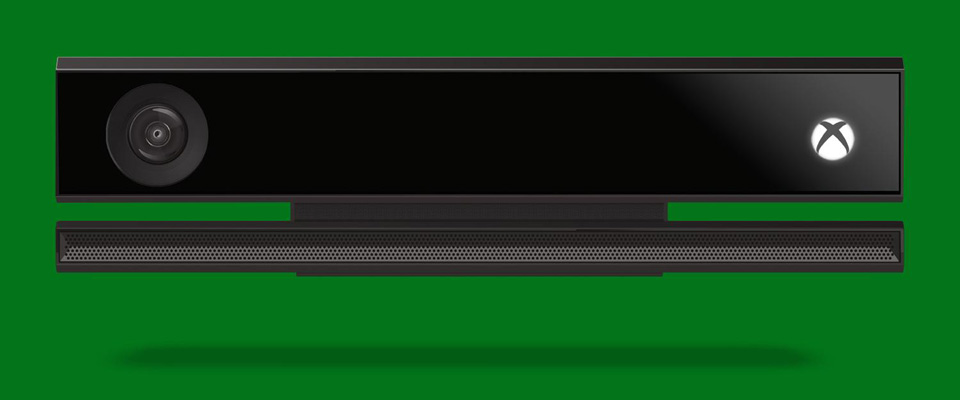
If you’re willing to submit to the practical necessity of Kinect usage, and you give it a little bit of time to learn the voice commands, it’s a smooth and slick experience. Voice recognition seems much improved, with some anecdotal evidence that it’s faring much better with strong local accents this time around. I had some difficulties in the first few hours, which may have been because I was suffering from a head cold so I was a bit stuffed up. Since then, it’s been functioning perfectly, with only occasional repetition of commands needed.
If you’re determined that you’ll never speak to your tech then navigation around the home menus will probably take a little more work and some learning before you’re entirely comfortable with them.
The range of apps and their functions feel a little bit unfinished but what is there is a great start and there are one or two elements of the user interface that have got a very bright future ahead of them. Get a screenshot function and live-streaming into there and all the major problems would be smoothed over for me but there is still a way to go in order for this system to feel quite as fully featured as its predecessor, regardless of the futuristic bells and whistles.


TSBonyman
I guess there’s bound to be a few quibbles with any new console – i know i’m going to find the lack of folders on PS4 annoying – but i’m sure things can easily be improved with firmware. I think with connected consoles, there’s always going to be part of the process it where it will be user feedback once the console is in the wild which will help to knock off the rough edges.
Broonba
A great wee read Peter. I’ll be getting a PS4 but it was good to hear about the functions of the nextbox from your personal experiences with it. The fact that both consoles have been released means that it’s a great time to be a gamer.
Voolar
Rumours are that the XB1 isn’t coping with UK TV PAL. Causing stuttering during panning shots on Sky etc.
Anyone experienced this..?
freezebug2
So many aunties and uncles with car deals, a very close knit community. Won’t the webbed feet impede the pedals? :o
Eldaveo
Brilliant console overall but I do have a couple of issues with it:
1) The party chat/game invite features are completely broken. Creating a lobby on Killer Instinct invites absolutely everyone in the party to join, whether they are playing KI or not. Likewise, if you have, for example, three people in a party, you cannot create a lobby in Ryse because it only supports 2 players. Really silly considering how perfect it was on 360
2) For me the Kinect had one chance to justify its £80 price tag and unfortunately I am not sold on it whatsoever. The voice commands can sometimes be a bit sketchy, the new “push” motion to navigate menus by hand are horribly inaccurate and the whole thing just doesn’t come across as a must-have component.
Overall though I am really enjoying my new console and consider it money well spent. Fifa and KI are a lot of fun and I’m just waiting for Forza to finish downloading today :)
Scotty34
I have a few niggles i have found that need patching asap.
This whole snap thing has taken a few hours but im not getting used to is. i like the idea of multitasking, but i like things tidy even if you cant see them and there electronic. So if i have a game running that im not playing or i have opened the store and no longer on it, the option to close it down would be great.
I find it more long winded to join a party than on the 360, also not only do you have to join the party, you then have to turn party chat on. Now i am experiencing when in game you can join parties, but for the love of god it wont let you turn on party chat! Me and my mates are all using the skype app instead (not ideal).
Battlefield regularly crashes, booting me back to dashboard this is due to losing connection to ea which i found happened everynow and again on fifa as well. which i guess is an ea problem. Also due to it being so new there are no hardcore servers so it takes a whole round of bullets to kill someone..
Im liking the kinect and the voice commands and the graphical leap from consoles is great. Think i prefered the 360 dashboard though at least for parties and checking who’s online. I got a windows 8 phone and find that works with touch screen, but as Peter said using the controller to navigate throught the dashboards is labourious and quite frankly shit…
Scotty34
wow should have re-read that before posting! apologise for all the grammer mistakes.
It was also supposed to say;I am getting used to the snap feature.
The Von Braun
Very well written article it must be said.
I’ve close to zero interest in Xbox One, despite owning the Xbox and 360, Forza, Titan Fall and Dead Rising just hold no appeal to me, but i was very keen to see just how much of the extra cost (and 10% of the GPU power apparently) could be justified by having Kinect as standard this time around.
So, basically, it’s far more than a gimmick, you don’t have to use it, but the experience is’nt as ‘smooth’ in terms of navigation etc, if you don’t.
Would you say that’s been done on purpose? for example, they could have implemented a smoother pad control system for menu’s etc, but if they had, it’d make Kinect seem less essential?.
Peter Chapman
I’d guess that it’s done this way because Microsoft is in love with its Metro interface and unwilling to admit that it just doesn’t work well enough when you remove touch control or mouse input.
Roynaldo
Interesting read cb. Not sure I like the idea of my console always watching me. However it does seem a vital part of its set up and design to be used.