
Just prior to their E3 press conference Sony announced that PlayStation 4’s Media Player will be available to download from PlayStation Store later today.
The much-requested Media Player application works with both your home server (DLNA) and with USB sticks via the PS4’s available ports.
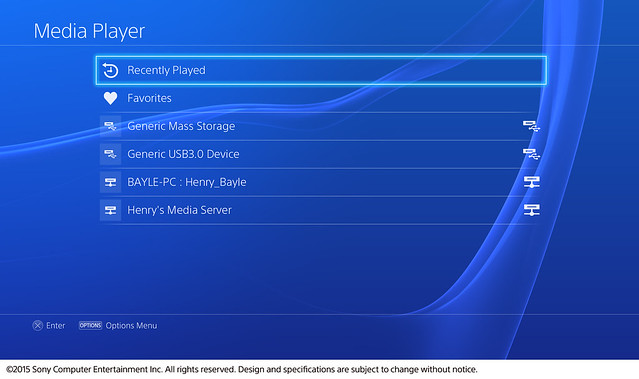
Supported file formats and codecs:
Video:
-
MKV
Visual: H.264/MPEG-4 AVC High Profile Level4.2
Audio: MP3, AAC LC, AC-3 (Dolby Digital)
AVI
Visual: MPEG4 ASP, H.264/MPEG-4 AVC High Profile Level4.2
Audio: MP3, AAC LC, AC-3 (Dolby Digital)
MP4
Visual: H.264/MPEG-4 AVC High Profile Level4.2
Audio: AAC LC, AC-3 (Dolby Digital)
MPEG-2 TS
Visual: H.264/MPEG-4 AVC High Profile Level4.2, MPEG2 Visual
Audio: MP2 (MPEG2 Audio Layer 2), AAC LC, AC-3(Dolby Digital)
AVCHD: (.m2ts, .mts)
Photo:
-
JPEG
DCF 2.0/Exif 2.21
BMP
PNG
Music:
-
MP3
AAC
M4A
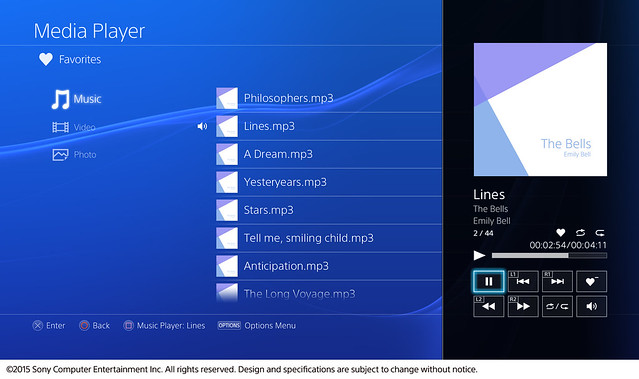
The Media Player will support background music playing throughout the PS4, much like Spotify does currently.
Source: PlayStation Blog.
Paranoimia
Yay!
Now people can move on to whining about something else.
TSBonyman
Nice, I guess i’ll be using my PS3 less now, except i have the bluray remote for that…
.. can someone get a bit of whining going on using the PS3 bluray remote with PS4.. ;)
djdustb
I hate the fact I have this piece of gear that will not work on one device but will the other, what is the point in not having it work, but also not giving us a decent alternative.
Amphlett
The last PlayStation peripheral I bought, apart from DualShocks, was the Move glowy ball stick. PlayStation have a habit of creating new wondrous peripherals which then only get used by specific games or apps.
MrYd
Which doesn’t make Project Morpheus seem like a good prospect does it. That’ll be hundreds of pounds to play not many games. And then a year later, you can sit there looking like a slightly rubbish robot space ninja. From the future.
fillip2k
I really like the sound of looking like a robot space ninja from the future.
I might buy a morpheus just for fashion…
ron_mcphatty
Yay! Time to get a bigger USB stick!
Voolar
What format do the USB Sticks need to be in…? Is there a restriction on File Size… Always a problem in the past.
ron_mcphatty
Yep it’s another Fat32 machine. So is the maximum size still 32GB? No way round that?
plutoniumdragon
There are plenty of apps around to partition and format to more than 32Gb. Apart from the individual file size limitation it makes sense to use a disk format that is nearly universally recognized.
DJ Judas
As said, there are methods of doing this, I used a Fat32 Format by Ridgecrop a couple of weeks ago to format a 2TB HDD for PS4 backup successfully.
The more annoying thing is why are they still not letting us place files on the PS4 locally?
JoeBoi
Sweet, I never moaned cause I knew it would come eventually. Excellent news :).
Starman
Ha ha, it’s all about games though! #irony
beeje13
I thought you said this was one of your most sought after features for your X1!
beeje13
Wait, I take that back, I misunderstood the feature, seems you still can’t load things onto the hard drive directly.
Starman
Yeah it is to be fair, just funny how after taking the piss out of ms for focussing on anything other than games it’s Sony who have had non game announcements at the last 2 e3’s.
bunimomike
When did Sony take the piss out of Microsoft about it not being about the games?
JR.
Wasn’t there an E3 a few years back when MS opened their conference and spent half an hour talking about TV/Sports? They did get some stick for that I think but not directly from Sony. Just gamers in general who wanted the focus to be on games.
I don’t think this announcement from Sony can even be considered in the same league. Their focus was on games and this was a little announcement on the side.
bunimomike
I’m just curious about where Sony took the piss out of Microsoft. Starman will get back to me, I hope! I’ve not pissed him off much… I’m sure. :-0
fillip2k
Pretty sure Kaz rang up Dom and was giving it the big’un about how the PS4 was a thoroughbred gaming powerhouse… I hear it made Dom cry and he had to leave MS cos of it…
True story… Honest….
fillip2k
Oh Wait its Don not Dom… And it was that Jack Tretton not Kaz…
Starman
@Mike there were some jibes & tweets here & there, as well as the whole 4theplayers which was a response to xbox seemingly being for watching tv rather than gaming.
JR.
To be fair though, they did show a lot of cool games too.
double-o-dave
Which means being able to use your PS4 as a Media Player too is an added bonus! #bonus
Amphlett
Well knock me over, over, over, and over again with the daintiest feather. Nice to see that Sony have bought this feature to the PS4 at last.
I wonder just how many people, like myself, have been holding on to their PS3s in their living room simply because of the DLNA media playback.
MrJimmy
Me for one, now I can finally move the PS3 to another room to reduce family fighting
DingSpal1
That’s my PS3 officially retired. It has become quite the burden in changing between the PS4 and PS3 (I was using the same power and HDMI leads) to use this feature.
Amphlett
Hmmm, thought as much. Several of my friends have also held on to their PS3s for the DLNA media playback. I expect that the trade-in value of PS3s will now drop even further.
MrYd
It’s got MKV support and people are claiming it’s lacking the Cinavia protection the PS3 had. It’s almost as if Sony want everyone to download pirated copies of things.
Andrewww
Now that would be excellent..! There’s so much stuff on my NAS which doesn’t work on my PS3 because of this, as downloading films in Switzerland is (still) legal. Hope you’re right..!
MrYd
I’m assuming it’s not there as this new media player is separate from the blu-ray player. On the PS3, it’s all part of the OS. Hit circle and you’re back to the XMB and whichever folder you’re in. With this new thing, you can’t back out any further than the list of USB devices and servers.
Cinavia is required for blu-ray players. It somehow got into the standards. I’m assuming the blu-ray player and media player on the PS3 are all using the same code to handle whatever you try and play, and so it detects that Cinavia signal, even in files on a USB stick.
That doesn’t explain why that handy little thumbnail timeline of the video isn’t there. I like that feature on the PS3. That thing that shows up (sometimes slowly) when you hit square? Although the PS4 can fast forward through videos without any delay when you start playing again, so it’s not that much of a disaster.
cnutard
There’s actually a pretty easy work around to cinavia. Just advance the date by a day or a week and it resets the timer. You might have to do this a couple of times during the course of a film, but still, a 30sec interruption can’t hurt if we aren’t willing to pay to begin with ;)
Andrewww
Just tried it, but my PS4 doesn’t connect to my NAS, while my PS3 works fine with it.
Thank you, Sony, for making technology really plug-and-play in 2015.
Not allowing for using ‘o’ to exit the application seems also quite stupid, as it is inconsistent with the other applications. But Sony’s never been strong in UX.
Amphlett
Andrewww, might your PS4 not connect to your NAS because your NAS is running some obscure media server software? Might the settings in the media server need a little tweak? Maybe the media server software needs an update? Just trying to think of reasons…
My QNAP NAS with TwonkyMedia server is connecting perfectly and streaming media to the PS4. No tinkering required.
hornet1990
Are you giving it enough time? I found it picked up all the DLNA servers on my network immediately bar one, which took a minute or two to show up.
No idea why though because the new QNAP default media server showed straight away, yet it was twonkymedia on the same device that didn’t show immediately.
Andrewww
Thanks for the hints, I’ll probably have to update the server OS, which I never do, as the thing is not connected to the router or the web. It’s a standard Synology box with no special media server software. And I’ve also waited quite a bit for it to connect.
Was just assuming that the PS4 could cope with a server the PS3 has no problems with. :o(
djdustb
Does anyone actually have this working with a Vuze server? My PS4 shows it can see the media server but says there is no media. On Vuze I can see my PS3 in devices but not PS4
Kamokazi-UK
Not yet, i can play some files through Windows Medial player, but for some reason i cant see my Vuze files though the PS4 even though i can see them on my WMP on the PC
surfer5664
I’m having the same problem. Vuze shows up on my PS4 but in the Vuze UI I am unable to find the PS4 so I can’t use it. hoping Vuze patches this soon or something because it is my favorite streaming program. please post if you find a fix for this.
Kamokazi-UK
Well i’m currently having trouble streaming through PS3 media Server v1.90.1. Hopefully it’s just because its an old version…