

With PlayStation 4 Pro out today and Project Scorpio set for release this time next year, the landscape of the games industry is changing quite dramatically. PlayStation 4 and Xbox One owners aren’t being left out in the cold just a few years after this current generation started, but there is now something better, something desirable to upgrade to. The question is, is it worth it?
The PlayStation 4 Pro’s pitch is that it brings 4K gaming within reach of the masses, just as 4K and HDR technologies are coming into the price range that people might consider upgrading their TV for. Does it do that? Well, kind of. Sometimes.
Three years on from the original PS4, technology has advanced to the point that the PS4 Pro launches at the exact same price point and offers twice the GPU processing power. While it’s larger than the PS4, it’s not that substantial a size increase. If anything, the fact that there are now two grooves that run around the edge of the machine gives the impression that it’s bigger than it actually is.



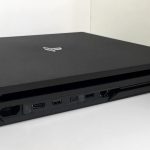


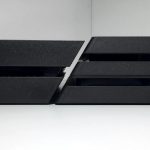
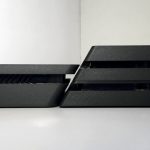
There’s common ground with the redesigned and slimmed down PS4, with rounded edges and a matte texture all over, but there are a few more premium touches to the Pro. a long LED light runs down the central tier, at either end of which are clickable buttons for power and disc eject – these are disappointingly clicky. Two USB ports exist on the front, while a third is round the back – this is presumably what justifies this being a “Pro” console? – and the optical output that was scrapped from the slimmer PS4.
Where the Slim was practically silent when idling, there is a noticeable fan noise here, and it can get quite loud under strain. There’s a lot more GPU power and heat to disperse, but that’s only in line with the original PS4 – 155W when playing 4K on Pro vs. 148W at 1080p for the original. The altered design doesn’t mask the fan noise, but it does change the tone. It’s a more neutral sound to my ear, like air whooshing, and not as intrusive. Play a game that hasn’t been updated for Pro, and the fan noise barely shifts from its idle sound.
Of course, the raison d’être is to play these patched games, whether older titles or those releasing in the coming months. At its best, the PlayStation 4 Pro outputs at 2160p, whether with a native 4K output – The Last of Us and Mantis Burn Racing are notable examples of this – or using checkerboarding and similar techniques to reach that resolution. Unfortunately, that is nowhere near universal.
Head to our imgur gallery for example comparison screenshots between PS4 and PS4 Pro in standard games and on PSVR.
Checkerboarding is deeply ingrained into the new hardware and the tools that developers use, taking an image that is somewhere between 1080p and 4K and extrapolating extra information for each pixel. It’s not quite the same as a native 4K image, but it gets incredibly close to it. Getting right up to a screen and peering into the detail, it’s slightly softer, but nobody plays games like that – you’ll get square eyes if you sit too close! – and it still gives almost all the impact of 4K.
Other techniques like Ratchet & Clank’s temporal injection can also work excellently, but of the list of 40 games with day one updates and support for the console, a number of notable titles do not have a 4K frame buffer. The added pixel density of 4K TVs do help to disguise when games don’t reach that target, but you have the likes of the inFamous games and the future release of GT Sport settling for 1800p checkerboarding, Uncharted 4 and uses more traditional upscaling from 1440p allied with anti-aliasing, and so on.
The further away from 4K you get, the softer the image will get, so the most disappointing instances are the games that stick to 1080p. Uncharted 4’s multiplayer is a key example, and so too is Epic Games’ Paragon. Both of those games were 900p on the base PS4 and only take a moderate step up in terms of resolution, albeit with more of graphical effects, better textures, filtering, lighting and more for the latter – Paragon is a marked improvement, definitely. With the Battlefield 1 patch currently AWOL – despite being listed for day one, their Twitter account has been rather evasive – there’s the nagging feeling that they might plump for the same option.

Only a select few games give you the best of both worlds, though. Rise of the Tomb Raider is the benchmark title in this regard, giving you the choice of standard PS4 1080p graphics with an unlocked frame rate, enhanced graphics at 1080p with 30 frames per second, or 2160p checkerboarding at 30 – it’s also one of the best examples of 4K on Pro so far. It’s a move that really ought to be adopted across the board, with games defaulting to 4K output, but giving players the choice if they’re not at that resolution
4K is only one part of the puzzle, though. HDR is the other, potentially even more transformative new aspect to the console – albeit also supported by the standard PS4. Brighter, deeper colours are a big part of this, naturally, but the best thing that HDR can bring is a huge contrast ratio and local backlight dimming, allowing for your eyes to more naturally take in a scene.
Ever tried to take a photo indoors, only to find that the windows are horribly overexposed, or that the interior might as well be pitch black? HDR has long been a technique on cameras and phones to get past that, and now it’s come to TVs. The problem is, it’s only the top end TVs that support the full range of what HDR can offer in that regard, gaining a UHD Premium label in the process, and lower end TVs that support HDR processing do so without local dimming and only barely improve the colour gamut. It’s a minefield.
To get the very best out of the PS4 Pro, you need that top of the line HDR TV then, but there are still benefits for those gaming on 1080p, they’re just nowhere near as tangible. It’s for this reason that I feel the Rise of the Tomb Raider approach should be adopted by more games, where it’s possible. In 1080p, I preferred to play with 4K supersampling, but others might rather have the improved lighting effects. It is somewhat ironic that when the PS4 Pro is aiming for 4K – and often misses that goal – it’s the first console to actually deliver 1080p across the board.

Finally, we come to PlayStation VR, and if you’re expecting a transformative improvement, you’re liable to be disappointed. There are limitations to the system that even throwing twice as much GPU power at cannot overcome, and games have almost all been designed with the base PS4 in mind – and doing an outstanding job in the process. That said, the Pro can polish off some rougher edges.
Battlezone has been minorly improved with more dynamic lights and a higher resolution super sample which helps make text within the tank cockpit more legible. Similarly, the image in RIGS is ever-so-slightly sharper, but Robinson: The Journey’s improvements are practically imperceptible to me. That’s less of a problem when Robinson looks fantastic, but more of an issue when Luge in VR Worlds still looks horrible, despite an update and seemingly increased resolution. Texture filtering is muddy, pop-in is still rife, and it doesn’t look good.

I’d also love to tell you that Driveclub VR has been drastically improved, resolution increased and pop-in banished, but I can’t. The other side to the PS4 Pro launch is that patches have all come in dribs and drabs. Some recently released games have support built in, others have had it patched in weeks ago, and for games like Driveclub VR, Hitman and Until Dawn: Rush of Blood, it’s launch day and we’re still waiting. For Driveclub in particular, a game which many struggle to play and have motion sickness, a big visual update feels important.
There’s no indications in the system to say that something’s been updated and now supports Pro, you have to look in the update history, and sometimes that sends you online to hunt for patch notes. It’s annoying, to say the least, but it also muddies the waters for early adopters. Why does Rocket League have so much aliasing? They might wonder.
The system software is almost entirely the same from PS4 to PS4 Pro, with just a couple of added options in the video output menu. However, one of the system’s best tricks is with the Share button. It now captures screenshots at 2160p and video at 1080p, with a fairly respectable bit rate around the 10mbps range, even if it can still suffer from the kinds of artefacts that a relatively low bit rate and on the fly compression can lead to.

The muddied waters of updated games also extend to the question of whether or not you should get a PS4 Pro. If you’re expecting a giant leap for PSVR, then no, not yet, but if you have a 4K or HDR TV, then this is the best way to get the most out of that TV and this hardware, and well worth upgrading. No, you’re not reaching native 4K across the board, but don’t get us wrong, what you can get out of this £350 console is truly remarkable for the price.
Upgrading is well within reach, but the bottom line is that the PS4 is still more than good enough for the vast majority of consumers. What we see today is just the beginning – PSVR and PS4 Pro share ‘The Future of Play’ as a tagline, after all – with higher resolution and HDR support bolted on after the fact. It won’t be until we see games released that have been designed with the Pro in mind and until the full scope of HDR TVs are brought in reach of the mass market that we can really live in that future.



Avenger
What’s exactly the difference between the HDR in the PS4/Slim and the HDR in the Pro? I know that HDMI 2.0 on the Pro might factor in somewhere, but where’s the advantage?
Stefan L
Technically very little, the real difference is that HDMI 1.4 doesn’t have bandwidth for 4K at 60Hz. Sony have managed to roll HDR into that older spec though – it was an updateable addition to HDMI 2.0 as well.
But HDR is always tied to a 4K TV, so you’ll be playing in 1080p and losing out on a great deal of sharpness and detail in the process.
Sammy
I’m attaching this to the first comment so people can see :)
Here’s a fun story and a cause of me returning the PS4 Pro back to Tesco tomorrow:
PS4 Pro has only HDMI 2.0 output. Which means that your 4k screen MUST have HDMI 2.0 input. Otherwise it’s a no go.
My screen has 2 DisplayPort 1.2 inputs and 2 HDMI 1.4 inputs. HDMI 1.4 can only do 1080p, it could potentially do 4k@30fps, but you see – PS4 Pro doesn’t recognize that as being “good enough”.
There is no “HDMI 2.0 -> DisplayPort” converter in existence – because apparently there’s no demand for it. You can go the other way as much as you want, but here’s the thing – those converters only work one way. I know – I have one.
camdaz
There’s a nice little TV that would show off the PS4 Pro at it’s best, the 100 inch ZD9 4K HDR at only £60,000 – yes SIXTY GRAND! I wonder how many of those they sell every year?
JR.
Just picked up my PS4 Pro. Traded in my old White PS4 + 1 Extra DS4 + 1 XB1 Pad + 15 PS3 games. Price matched with CEX which almost doubled my credit. Then I took advantage of a promotion which let you buy Dishonored 2 for £20 when purchasing a PS4 Pro. I bought the game for £20 and traded it back in for £37. Then I traded in the black DS4 that came in the box and bought a Red and a Blue V2 DS4. In the wnd I only had to pay an additional £46. Plus I got £11 in points on my card, so really it only cost me £35 to get a brand new console and 2 new DS4’s.
I love it. Sooo quiet compared to my original PS4.
ron_mcphatty
Nice! It’s like extreme couponing but a lot cooler! Hope you’re enjoying it, seems like the reports on fan noise are a mixed bag but hopefully the extra power comes into its own next year.
tactical20
Looked at the imgur page… Honestly can’t tell the difference between them! My eyes must be getting old, ha! So yeah, the only time I’ll be considering a pro is if my normal PS4 dies.
camdaz
Did you view them on a 4K display?
GoosePies
Swapped out the hdd for my 2tb. So mine is gonna be downloading all my games and saves all night and hopefully ready to play tomorrow night ?
Really hope drive club vr gets a big improvement, when you said you would like to say it has but you can’t, is that cause the patch isn’t live yet or it simply hasn’t improved it? Sorry if the question seems stupid, I’m really really tired ?
camdaz
If you check out the DriveClub VR video on the site below you can see some improvements, especially the lighting and the edges of objects look that little bit sharper. Inside the car dashboards looks a bit less fuzzy so hopefully you can read the gear indicators better.
The lighting in Ocean Descent is tons better and make the images look less flat.
http://powerupgaming.co.uk/2016/11/10/psvr-titles-driveclub-vr-until-dawn-rush-of-blood-more-get-ps4-vs-ps4-pro-comparisons/
Stefan L
There hasn’t been a Pro patch for Driveclub VR yet, and any improvements you’re pointing to are minimal at best, when it really wants to see a pretty big step up.
VR Worlds has been updated and there’s some nice stuff there, but I picked on VR Luge because it looks downright bad on PS4 and PS4 Pro offers little to no step up.
GoosePies
Thanks camdaz, looking forward to trying it out tomorrow so. I really like the pre patch game but how soft it looks does grate eventually , hoping the draw distance is a little better as would be great to see a little more detail of what’s ahead of you.
Cheers again for the vid ?
GoosePies
Thanks Stefan. Here’s hoping :)
GR3210
Driveclub vr on pro is no different, well slightly sharper cockpits but blurry low res graphics in background still their.but I still love it
Andrewww
Thanks for the review, no PS4 Pro then for me, unless my ‘old’ one dies at some point. I’m perfectly happy with the graphical quality so far, am regularly stunned by how good games look and how many details you mostly don’t even pay attention to when playing, e.g. in The Division.
What will be your review strategy from now on? Does this add the burden for every game that you additionally need to check it’s looks on PS4 Pro? Given the differences are so subtle, it’s probably not worth the effort.
Stefan L
Basically no change. If we can check how it fares on Pro vs. PS4 (or vice versa), we will, but graphics are only a part of the equation. Similarly, when we review a multiplatform game, we only review one version of the game, whether that’s PC, PS4, Xbox One, or whatever, but sometimes the Xbox version runs at a lower resolution, etc. etc.
Andrewww
Ok, thanks, makes sense.
Sammy
I bought the PS4 Pro yesterday in Tesco for £336, hooked it up to my 4k screen and… realised that the HDMI ports on my (PC) screen are bafflingly only 1.4. So naturally the 4k output on my PS4 Pro is disabled by default and cannot be enabled.
Fortunately I still have a mini-display 1.2 port free so now I just need to buy a HDMI 2.0 => mini-displayPort converter…
On the topic of the 1080p improvements, that is really the only bit I actually care about, along with AC wifi and 1080p remote play. I’m not into playing in 4k because my PC screen is a PC screen. I have all that estate because I like to use it, and not waste the whole thing for gaming :)
It is however super-disappointing that the “enhanced” 1080p modes don’t bring real game-changes like improved textures! Rise Of The Tomb Raider should have no problems running on PS4 Pro with “very-high” PC setting textures, but somehow they’re just not there…
Stefan L
Oh man, I was looking at those converters a while ago, and they are so expensive!
I’m not sure why you wouldn’t be playing in 4K though. If your screen has that resolution, then absolutely do it if you can.
ricey787
I’ve had this problem too and found this thread – http://community.us.playstation.com/t5/Consoles-Peripherals/PS4-Pro-with-4K-HDR-TV-no-picture-only-sound/td-p/46033633
Basically, it will work if you disable HDR. Which sort of defeats the point really. Mines going back for a refund
Sammy
The main problem is that this is a 40″ PC Screen that I sit maybe 2 feet away from because of the way I utilise it. I don’t see it as a 4k screen, I see it as 4x 1080p screens, in my work I have to focus (lol) on many things at once and this sort of broke my attention span completely.
So now if I wanted to play in full screen on my PS4 Pro, I would have to switch the screen back to my PC anytime a 10 minute loading happened.
Which is why I just don’t play full screen and do stuff on my PC whenever I have to wait, while looking at the PS4 window off to the side :)
fillip2k
Out of curiosity, I have a 2k monitor which is what I use for PC gaming and the PS4. Does the PS4 pro output to 2k as well or is 1080p or 4k only?