


Two Point Campus update 1.5 is out now, adding a bunch of new cosmetic items to the game, making a major quality of life improvement with job assignments, and squashing some inconvenient bugs in the process. The patch is out now for PC, Xbox Series X|S, Xbox One and PS5, and will be rolling out ASAP for PS4 and Nintendo Switch – there’s some more bug fixing to do for these platforms
There’s a smattering of useful new items added for free in update 1.5, with small radiators and air-con units being added to Two Point Campus, with fans having missed them since Two Point Hospital. Alongside that there’s a new see-saw ride that will boost the relationship between any students that use it, and provide entertainment, while there’s a bit of solo fun to be had with the new personal mini-golf course.
Helping you to put an individualistic touch to your campus, there’s a bunch of new hedges and fences available, as well as new path patterns and two new pathing tools.
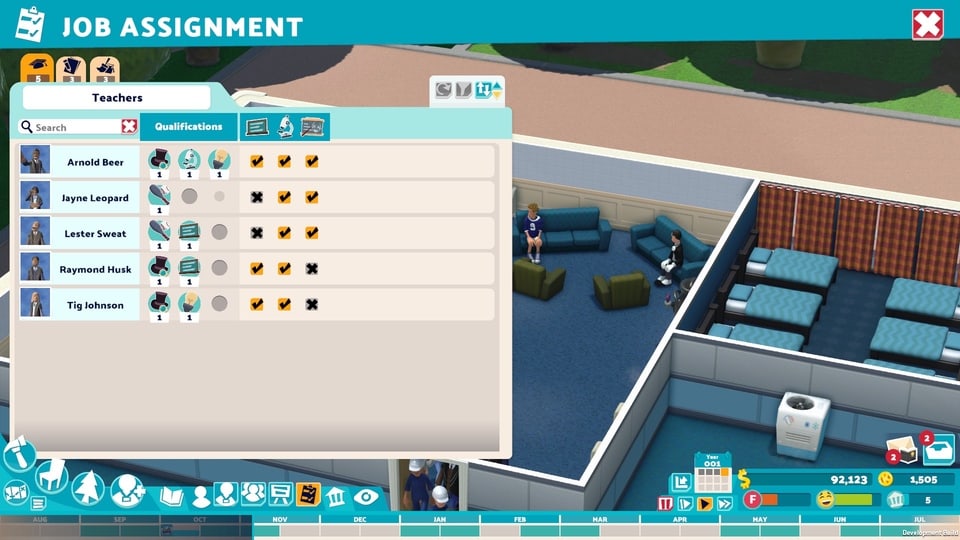
And finally, one of the most requested features is the Job Assignment screen, where you can narrow the focus of your staff so that they will only work in specific areas – this was something that narked us a little in our Two Point Campus review!
Here’s the full Two Point Campus update 1.5 patch notes:
General/New
- New UI: Job Assignment Screen
- Updated UI: Added text search to student and staff lists
- Customisation: New paths and new extendable flower bed
- Customisation: You can now customise extendable items! We’ve added this functionality on the wooden fence and will be adding it to more items in the future!
- New items: See saw, mini golf, mini radiators, mini air conditioning
- Added temperature filter to the item menus
Bug Fixing
- General stability improvements
- Balance adjustments for satisfying of needs:
- Students are more likely to prioritise satisfying needs over other activities when needs are low
- Students try to satisfy needs nearby when waiting in the queue for a room
- Fix for sandbox plot merging issues which was causing spawning issues with students in sandbox (when unlock all plots is selected as an option or Creative Mode is selected).
- Fix for Campus events being selected when editing event settings
- Fix for Campus Overview sometimes not showing information
- Fix for template button prompts being incorrect when in placement mode
- Fix for closed event rooms being removed from the timetable
- Fix area of Blundergrad where it wasn’t possible to place items
- Added more specific messaging in blueprint build mode when buildings or rooms are not completable due to being unreachable
- Fixed a bug where having plots unlocked in Sandbox options would subtract the value of those plots from your balance on game start
- Room customisations can now be applied to all rooms and will carry over to newly placed rooms of that type
- Fixed end-of-year awards being given when closing countdown message
- Slightly reduced lecture seating nav bounds to reduce placement and reachability issues
- Fixed missing SFX on customisation apply button
- Fixed missing controller bindings for the switch profile input action
- Added additional UI support for favourite student feature on the students list
- Added dedicated invalid build position message for outdoor rooms not being built outdoors
- Prevented dig site door being placed in 1 tile corridors in blueprint mode
- Fixed issue with temperature items not always working with merged plots
- Fixed typos in Blundergrad 3 star letter and Noblestead 2 star letter
- Fix for it being difficult to select some fence posts
- Fixed timetable objectives being read from the wrong timetable when in summer break
- Fixed missing item error in the room inspector not updating when item is placed
- Fixed training menu gamepad scroll not working when the first item is expanded in a long list
- Fix for modifiers not being applied when upgrading the training pod
- Shrink nav bounds of big floodlight pole so they don’t overlap the insides of buildings
- Fixed item/room tooltips going out of the screen bounds
- Prevented dig site door item placement directly opposite dig site wall to fix nav access issues when floor is lowered
- Removed photo mode keyboard shortcut
Two Point Campus is a great follow up to Two Point Hospital, adapting this quirky brand of management sim to feature the building and running of a university campus. In our Two Point Campus review, I said, “If Two Point Hospital was a triumphant return of the Theme Hospital style management sim, then Two Point Campus is a true heir. It takes the same tongue-in-cheek tone and applies it to a new setting, it learns from the journey its predecessor went through, and it deepens the experience for anyone that wants it.”
Source: Two Point

