
It was way back in January when I first noticed Nyko’s Media Hub Slim amongst reports from CES. At the time it had not been long since my launch-day 60GB PS3 had died and my new Slim’s lack of a memory card reader and only having two instead of four USB ports was causing me some consternation.
It was not until August that the Media Hub Slim (MHS) finally became available in the UK and I was able to get hold of one. So what do you get for your £19.99 (RRP, I have seen it as low as £14)?
The MHS is a small module that plugs into both of the USB ports on your PS3 Slim. It will not fit earlier PS3 models. In exchange for using those two ports it provides you with four and also features a card reader that will read both SD Cards and Sony’s Memory Sticks. It also sports an IR receiver for the included 15-button remote.
The module initially feels like the relatively cheap piece of plastic that it is when you take it out of the box. However, once attached to your PS3 Slim it, thankfully, feels a lot more solid, gaining rigidity from its host. I say “attached” because rather than just plugging into the USB ports there are two small lugs on its top that locate into a Death Star trench-like channel that runs around the underside of the projecting parts of the PS3 Slim’s shell.
A concern prior to attaching it had been that it might pull out easily when unplugging a USB lead but that is not the case as it attaches very securely. The front is not quite flush with the PS3, protruding just a millimeter or two but that is barely noticeable and unlike some PS3 USB hubs it does not obscure the HDD and Wi-Fi LEDs and does not require an external power supply.
The four ports it provides you with are all powered sufficiently to charge controllers, Sony’s USB headset and operate the PS Eye, or any combination of those. If charging times are lengthened as it only has two ports to draw power from I have not noticed.
Taking both SD and MS Pro/Pro Duo cards the card reader ‘does what it says on the tin’ and has read the variety of those cards I have to hand without issue. SD cards use the full width of the slot, while MS cards fit in its centre and slide further inside.
The cards appear on the XMB as “USB Device (STORAGE DEVICE)” and can be browsed and navigated the same as any other storage device. A red LED comes on when a card is inserted and blinks to show when the card is being accessed.
The remote is functional. It makes no concessions to ergonomics in its shape, simply being a plastic slab 86mm x 40mm x 7mm in size with rounded corners. The buttons take a slightly firmer press than I would like but provide all the functionality you are likely to need.
The ‘Play/Pause’ button operates the same as ‘X’ does on a controller, ‘Back’ is ‘O’, ‘Options’ is ‘Triangle’, ‘Top Menu’ is ‘Square’, ‘Display’ is ‘Select’, ‘Start’ is obvious and the ‘H’ in the arrow, Home, is the ‘PS’ button. As with other USB-connected controllers (other than plugged in Sixaxis’ and Dualshock 3s) you cannot turn the PS3 on with the remote, but you can switch it off with the Home button.
The remote, or rather the presence of its IR receiver on the hub is the source of my only criticism of the MHS. Like other USB-connected controllers it will grab the lowest available controller ID if plugged in when the PS3 is switched on. Some games will only work if you are using controller 1 (e.g., Fallout 3) while others (e.g., Dragon Age: Origins, Borderlands) are more accommodating.
Typically, I switch my PS3 on with a controller and in that case the controller will get assigned as 1. So it does not often cause me a problem and I am normally playing single-player or online so it does not pose a local multi-player issue either. Though if most games are like Borderlands and accept controllers with any ID for both local players, it may be something of a non-issue.
It has caused no conflicts with my Move controllers yet and while I have not tried it with all my Guitar Hero World Tour instruments attached, the controller reassignment possible on the PS3 should get around the issue if it does occur. Nyko are obviously aware of this a they provide clear instructions for reassigning controllers on a piece of red paper. Just be aware that while plugged in it is taking up one of your seven available controller IDs.
I have been living with the MHS attached to my PS3 for a month now. Aside from the odd time when I have switched my PS3 on with the button on its fascia and started a game that will not recognise a controller that does not have an ID of 1, I have had no problems.
My PS3’s standard set of connected items is now back to what my launch-day 60GB had, a charging/ready-charged controller, Sony’s USB headset and (especially handy now Move is out) my PS Eye. So everything I need is now plugged in all the time and I still have a spare port should a SingStar/Rock Band/Buzz itch need scratching.
Given how easy it is to use a standard controller when playing video on your PS3 and that anyone serious about consuming films is already fairly likely to have Sony’s Bluetooth remote, the MHS’ remote seems redundant. I would go as far as to say it would be a better product without the remote, selling to people like me who want to replace the lost USB ports and card reader or to those who simply want to gain what the PS3 once had.
As it stands though, as long as you are prepared to put up with having to occasionally reassign a controller, Nyko’s Media Hub Slim is a great little product. It has become my most used PS3 accessory, by virtue of always being used whenever the PS3 is on and I can only foresee that changing if Nyko release one without the remote.
If you have a desire for more USB ports on the front of your PS3 Slim, Nyko’s Media Hub Slim comes with my recommendation (whatever that’s worth around here).
It is available now from the likes of Amazon and ShopTo and as always we would appreciate it if you used our affiliate links on the TSA Store page when doing your online shopping.
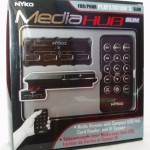
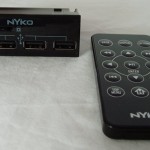


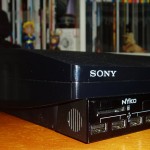
Apologies for the quality of the photos, I do not have a good camera, a studio with decent lighting or any photography skills. All of which are likely self-evident. :-)
beeje13
great in depth article, If I had a slim I probably would have bought this, and there’s nothing wrong with the photos :P
Dazbobaby
Unless it’s mains powered it’s a fail for me. It’s just a glorified USB hub. I can get a card reader and powered hub for £15.00 and they’re not the cheapest around either.
Without mains power I can’t attach my 3 hard drives, my USB charging cable, my PlayStation Eye, or my card reader.
And it’s not really a “media hub” it really is just a USB hub.
teflon
the main attraction is that it isn’t an unsightly mess of cables, but an unsightly slightly off-PS3 colour attachment to the PS3.
Watchful
Actually, from a couple of feet away it does tend to disappear when attached. The camera flash at close range does tend to exaggerate the differences.
Watchful
So your requirements are different, fair enough, but without mains power this will attach your USB charging cable, your PS Eye and if SD and MS are your thing you wouldn’t need a card reader if you only need your PS3 to read them.
And arguably it is a “media hub”. It certainly is not just a USB hub.
Dazbobaby
media is movies, music, and photo’s.
hard drives and memory sticks are a medium on which these are stored.
It is not a media hub, it is a usb hub.
dirtyhabit
Why does it need to be mains powered? I have a belkin(?) hub, £9.99 from pc world, I run my HDD, PS eye, PlayTV and charge controllers all at once. That’s not powered? It sits under the PS nicely as i have it raised up on M12 nuts ! For ventilation. A Card reader would be nice tho….
Tuffcub
One of my USB ports borked on my PS3 at the weekend, I got a shiny new 4 port USB hub that lights up electric blue.. from the 99p Store at the top of the road :) WIN!
Erroneus
Hopefully Sony will add more USB ports for the the next hardware revision and for sucks sake, add some ports on the backside.
Averna
I’d buy that
cc_star
Yeah the PS3 badly needs a powered USB port on the back, the cables coming out the front ruin my setup, particularly the PSEye
PriceKitty
He doesn’t really take too much care of his ps3 does he? xD
I dust mine off, wipe it down and blow the dust out of the inside all every week.
Watchful
You don’t need to talk about me in the third person singular. I’m still around, so second person would be fine. :)
TSBonyman
A very informative review Greg, thanks.
I think i would like it better if the colour/finish matched the PS3 and it didn’t have the logo and detail on the front but the hub serves it’s purpose all the same.
It’s also a shame that you can’t disable the IR.. I don’t suppose you’ve tried opening it? :)
Watchful
Not yet, though I have been tempted…
It will likely end up on the same list as my plans to fit LEDs under the PS buttons on my Sixaxis’.
Serebii.Net
You have that Sackboy Doll..
I covet it…
cam the man
I use the built in card reader on my ‘fat’ 60Gb all the time to back-up my game saves, so if/when I get a slim I will need something like that.
Good review.
MegaBonez
This kind of pisses me off to be honest! Back when I had an 80gb fat, I could of done with the card reader to expand memory, now I have a 250gb slim and I don’t need it!!
dude90
Looks I’m better off with my usb hub from Poundland, oh how things come cheap these days.
BalramRules
this doesnt seem interesting (da product, da article’s great) =1
i personally wouldnt purchase