
Why GT PSP Looks Awesome

One technique used to make much nicer graphics.
Published 12/10/2009 at 16:00 by BioEye
Related stories (more)
The Stone Age Gamer [20]

gt

Ever noticed that burn you get on a PSP screen? I definitely have with my PSP-1000. I’m talking about the way in which fast-moving objects will leave small trails on the portable screen. This was especially noticeable with early PSP games such as ‘Ridge Racer’, and its car headlights. It’s this screen latency that’s used to the game’s advantage. PSP graphics have a habit of being home to sharp, jagged object edges. Any diagonal line (more-so when moving) will seem jagged, as if you drew it using Paint. It doesn’t look anti-aliased. It doesn’t look straight. It looks all bumpy and nasty.

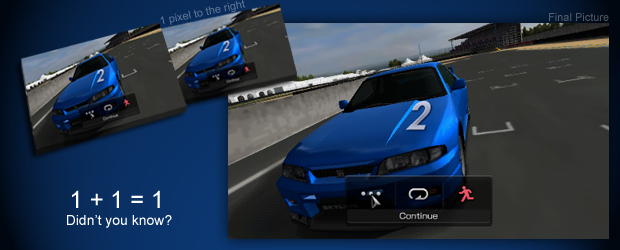
Pixel lovers at ‘Beyond 3D’, have figured out Gran Turismo PSP’s ‘trick’. The game displays the normal racing scenario, but also moves the camera half a pixel every other frame. So there are two very similar images flashing together. With the game running at 60 frames per second, that’s 30 every second with a slightly different camera angle. If it weren’t for the LCD screen’s latency, the ‘vibrating’ image would be very apparent. But instead the two images, being left on top of each other, blend together. Using this method, edges look much smoother and more on par with PS2 graphics rather than PS1 or PSP.

Funnily enough, the final image was never used for any of the released in-game screens, which is why it looked so jagged in comparison to the final game. Weird. But still, nice to know how this stuff works.

Source: NeoGAF

Comments

Please note that all comments are the opinion of the individual author and not TheSixthAxis.

1 2


  1. i’m impressed :)


  2. Isn’t that quite an overhead for the PSP to take on or is it as simple as can be.


    • My understanding is that it only renders one image at a time, alternating between the two every frame.

      I suppose it’s a bit like how some 8-bit games switched between which enemies were being drawn every refresh so as to overcome sprite limits.


      • *tips hat*… thanking you. :D


  3. Pretty cool stuff. They’re good at getting the best out of a console aren’t they?


  4. Wait.. whats with the italics?

    and its awesome that they worked around to do this.


    • My mistake. That’s what happens when I proof stuff and not Peter…


  5. That’s awesome.

    Ridiculous, but awesome


  6. Impressed on two points. Firstly that Polyphony can push the PSP to render at 60 fps and use the split frame technique and secondly, that Beyond 3D are able to get so deep in to the mechanics of each frame,


  7. Woah, does this mean that if i get it for my PSP 1000 it wont look as good?


    • I think you need to try re-reading the article. All PSP screens have this visual artifact – including the PSP-1000 screen.


      • Ahh sorry, was in a rush so just skimmed this article.


  8. Ah, that explains the option to switch between PSP screen and Video Output in the video options for the game. Very clever.


  9. nice


  10. Thats amazing – how far they go to get the game looking right!
    Dont you also get burn-in with Plasma TVs or is that something different?


    • I think so if you leave the same image on for ages.


      • that’s true my HDTV has tools on it to clear burn-in/dead pixels


      • How can dead pixels be cleared?


      • I was thinking the same thing!!??


  11. Clever!! I haven’t got the game myself yet, but I have had a go with it on a mate’s PSP and it does look stunning!!


  12. Cool i didnt understand a thing but cool


  13. This is quite a tried and tested method in videogames – it’s nothing unusual. Both Wii and PS2 support this kind of rendering. I didn’t know PSP could do it – but I’m not shocked. Does this mean that the frame rate drops when using the video out mode though?


  14. Wow!


  15. Impressive stuff from Sony, they do know how to push their tech.
    I have a 3 hour train journey to London in a few weeks so I think this is getting purchased!


1 2