

With Share Play, the PS4’s latest and perhaps greatest online feature, allowing you to share your screen – and your games – with your PSN friends, Sony have yet again proven that their purchase of Gaikai was worth its weight in gold. Not only do we have Remote Play on PS Vita and PS TV, where you can stream any PS4 game to another screen, big or small, or PlayStation Now (well, it’s still to reach most of the world) where PS3 games can be streamed straight to your devices, but we have Share Play, which brings online multiplayer gaming to practically every game.
Whether the game’s only got local co-op, or you’re taking turns playing through a single player game with a friend, switching who is in control every now and then as you would if you were sitting on the same couch, the possibilities for Share Play are quite vast and – providing PSN isn’t down and your connection is good enough – they can work pretty much instantly, too. It emulates couch multiplayer in quite an innovative way, updating an old way of playing for a new generation of players.
So, if your connection is good enough, you’ll be able to share your games with your friends; while I’ve got a moderate 15MB download speed, my rather abysmal 1MB upload unfortunately meant that I couldn’t let my friends join me online to play one of my games, and they – with their fibre connections – had to host, so I’m mainly going to discuss that side of things.
When I loaded up Share Play, I jumped into Aran’s game of Race the Sun, a PSN game which he’s currently reviewing. Here, we took turns trying to get the highest score, swapping each time we had to restart. This is something that you’d do locally but would never usually have the opportunity to do online, and really shows the potential of Share Play, uniting people who don’t get to sit on a sofa together more than once a year.
Visually, the shared screen can be a bit hit or miss; Race the Sun looked superb, very much like a high-quality streaming video, but when I played FIFA 15 (with another friend, so it could’ve been a disparity in the connection here) it looked less than stellar, with blurry crowds and some lag. Games such as The Evil Within or The Last of Us, which are quite dark, can also look a tad disappointing when being streamed across the internet. Furthermore, when the host player receives a message or notification, an unsightly black bar will cover a large area of the screen for the other player.
Thankfully, there’s a good balance between the visuals and the input lag, with it favouring the latter rather than the former and always making sure that your button presses are registering with a delay of milliseconds, if not instantly. It’s never too hard to play a game like this – if the inputs were delayed while the streaming quality was high, it would be far more tedious than it is.

The secondary player is quite limited in what they can do, but it’s pretty much in line with what would happen if you were playing a game at a friend’s house – you can’t record or take screenshots, and you won’t earn trophies as you don’t actually own the game, while the host will be able to do both of these. It could be quite interesting to see people play other people’s games to help them out with a particularly difficult section or collect an elusive trophy, however.
Playing on the other person’s screen over the internet is quite a surreal experience – it’s almost like you’re entering their living room as an invisible entity, controlling their game as they watch. It’s a novel feature for sure and although play sessions are limited to one hour per go, you can just jump back out and back in to play more of the game. Unfortunately, it doesn’t seem as though you’re able to play every game available – during our testing, we found that LEGO Marvel Superheroes and Sportsfriends didn’t work, two games which we were eager to play online.
It makes sense for Sportsfriends, which requires you be in the same room for at least one mode, but the error message was strange, stating that “viewing the game screen that the host is currently playing is not allowed due to content restrictions in your country or region” – that seems like a generic message, and since we were both UK-based it didn’t quite make sense, with people outside of the UK using them over Share Play. Other games which didn’t work with the service were Tomb Raider and PixelJunk Shooter – let us know in the comments section if you’ve had problems with any others.
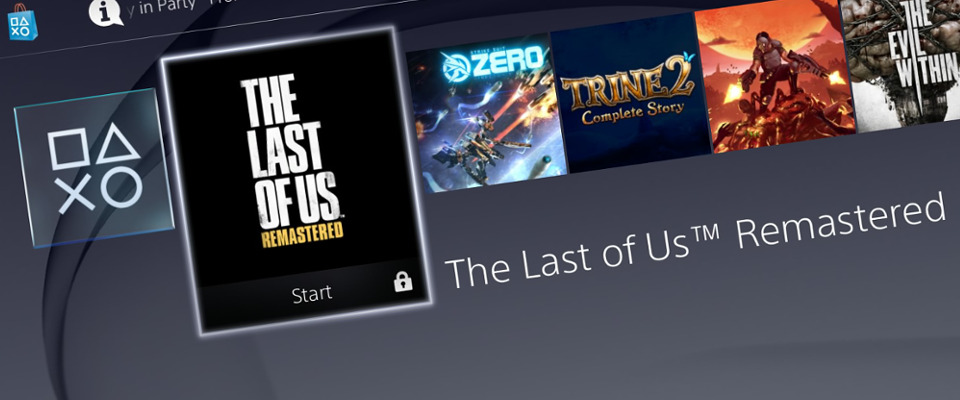
Once you’ve had your fill, and you leave your friends’ virtual sofa to head back to the boring one-seater chair in your room, you’ll notice that all of the games you played in your session are now on your home menu. You can’t play these, but clicking on any of them will reveal more information on the title and allow you to purchase it, or you can just delete these without too much hassle. This makes sense, really, and is a fair trade for your free go of the titles.
It’s all building on from that original message which Sony sent when they revealed their stance on trading PS4 games, and it feels wonderfully inclusive for those who might not have certain games. For TSA, it’ll be quite useful too – since we’re dotted about the UK (and beyond), we can’t easily review co-operative games without outside help. Now though, we can just jump on our PS4 and share the game over the internet, albeit in hour-long bursts, with what is a very practical and streamlined system.
Share Play still isn’t completely functional at the moment, with vibrations and controller sounds still coming through the host player’s DualShock 4, and some connection and compatibility issues. What it is though, is one of the rare things about the PS4 that feels truly next-generation, and despite requiring PlayStation Plus, it feels like Sony are offering another innovative service, and one which competitors in all markets are sure to be keeping an eye on.


dirtiestturnip
This is one of those things that sounds really really good, is really really good, but I will never actually use.
kjkg
Haha so spot on I think. Can’t see any situation I would use it. Maybe if a PSN friend had a game that I was tempted to buy but wanted a shot first.
Youles
The beauty of that is you also don’t end up with a 0% trophy list, which you would have if you tried the disc on your system but didn’t like it. :)
I’ll mostly use it for local co-op trophies, since the wife isn’t too fond of gaming and I practically have no real-life friends.
Kennykazey
I’m in the same boat, the only time I could see myself using it is if a game only supports local play and I want to play with a friend online. :-)
tactical20
This, lol!
Paulret
Why not use ? If you use it by an hdmi converter of http://t.co/lF0CF8Fzf2 ,It will be better and really really better.
Forrest_01
Better & really really better??
Wow. Sold.
TSBonyman
Or for an even better deal go here ..
http://goo.gl/tq9V
Youles
Cool, I thought it just let someone take control of your game. Local co-op games played across Share Play will be amazing…..now, just to rope in R1MJAW to assist with Guacamelee! Super Turbo Championship Edition, and someone else to help me achieve FIFA 15’s pesky Extra Effort trophy!
Great read btw, thanks.
Youles
Also, I might start offering £1-per-hour rental service, if anyone wants to try any of my games before they buy :p
Potentially people could game-share with their friends (albeit in 1-hour bursts), if they were happy to have each others’ PSN accounts on their PS4’s. The game owner could login as their friend on their own PS4 (and vice-versa), then they could earn trophies and obtain a save file, which could also be transferred back to their PS4 via the cloud. Obviously it would just be easier to swap discs with your friends.
R1MJAW
I can try and help you out with the Fifa trophy if you want mate.
Kamokazi-UK
Well i’m going to be trying Alien: Isolation this evening…fingers crossed that’ll work.
JustTaylorNow
Anyone willing to let me try drive club or alien, holla at ya boy!! Lol
yarg2k7
Your welcome to try my driveclub if you add me and I’ll let you on when the kids are off. Will be interesting to see his it goes.
JustTaylorNow
Ah cheers, my ID is Virgo21Child :)
double-o-dave
Very impressive overall. I tried to host a game of FIFA last night and failed but wasn’t that surprised as my upload speed was only about 600kb. I’m guessing your upload speed will have to be around 3-4mb if you’re the host.
Amphlett
Blair, the photo halfway down the article, which is you and which is Aaron?
bunimomike
Blair is Scottish so I assume he’s the pasty white one. :-P
bunimomike
Lovely to hear the promise it has but would love more feedback from two friends who are on good connections and also network cables to the PS4s as oppose to wifi.
Tuffcub
I was running on cabled PS4 on 156gb when I did some tests with Blair :)
Bornindafire
Give us what we want and not what you wanna give us #SONY
GTOWN
I’m gonna regret this but……
What do “we” want?
NotSmartEnough
It feels like this would enable a kind of ‘try before you buy’ enhanced demo service.
Just wondering if we could get a forum thread going where requests like Taylor’s could link up with TSA members with the requested game.
My only concern about the whole Share Play thing is with games like Alien: what if a guest saves in a really tricky situation in a game with limited save slots?
camdaz
Good idea for the forum thread for folk to try games.
I would be happy to be a host for TSAsians to try games but if Blair was having problems with his “1MB upload” then there’s no chance of me being able to host.
NotSmartEnough
Happy to host, ps4 reckons upload is 4.4, but the PC says between 5 and 6. Not sure what Sony recommend for stable game sharing?
Munniz
It works really well for Injustice but when trying out Disney Infinity 2.0 got the content restriction message same with Shadow of Mordor, we are both in New Zealand. But when I shared SoM with my mate in the US it worked fine, however Disney Infinity still wouldn’t share. I hope that Playstation sort this out as my kids were really looking forward to sharing DI 2.0 with our mates kids.