

You’ve probably heard already that Windows 10 is here and free to those who purchased Windows 7 or 8, but for Xbox One owners, they a special treat in the form of the revamped Xbox app. In addition to being a hub for all your friends’ Xbox shenanigans, extending Microsoft’s network to the PC properly, it also has a Game DVR suite that lets you use your graphics hardware to quickly capture gameplay footage for sharing with friends and the ability to stream from your Xbox directly to your PC. It’s an idyllic pitch, but you need to put in the effort to make it work.
Setting it all up required a little bit of patience. With access rolling out in waves to the hundreds of millions of eligible Windows users in wave, you might be waiting for Microsoft to let you know that Windows 10 is ready for you, or you can just Google the download link instead and save yourself the time. Also, once you’ve installed Windows 10 fully and are able to use it, the Xbox app might not work to begin with. Naturally there are troubleshooting steps, but my issue – that of the “Connect” button simply not appearing – was not on that particular list, and it was only through searching for a solution that I discovered I had to manually visit the Windows Store and re-download the app. Needless to say, this wasn’t an intuitive process.
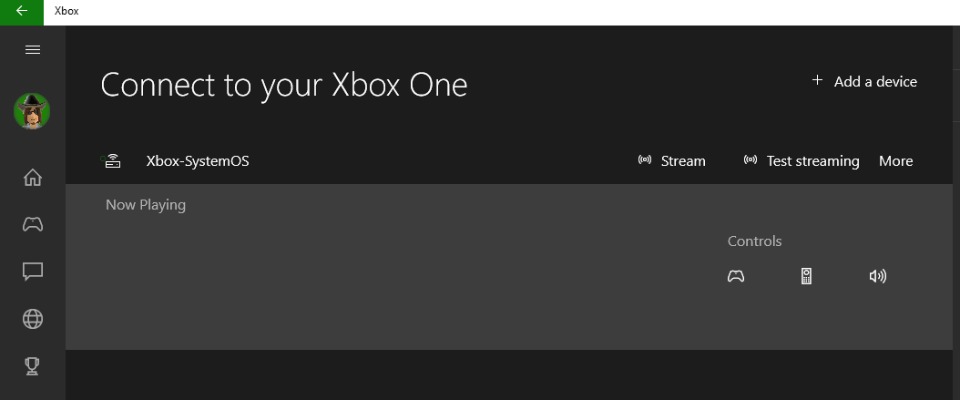
Once set up though, connecting the Xbox should be a doddle. For me, it was as easy as clicking a couple of buttons and I was on my way. Now bearing in mind that the laptop I tested it with has an integrated graphics card, it shouldn’t be able to run Xbox One style graphics on its own. It does however have more than enough processing power for the Xbox One stream to be almost flawless at first glance; rendering at the laptop’s maximum resolution.
But then I got to thinking: We should push this to the limit. So I loaded up Killer Instinct and got to fighting. In terms of frame drops, if there were any, they weren’t exactly noticeable. Running fighting games at 60fps with minimal latency between the two is quite the accomplishment, and while I wouldn’t dream of using the PC to actually play online as those precious frames are… well, precious, it is at least good enough for casual play.
It was the same story when I then loaded up Mortal Kombat X, before testing the baffling ability to stream from the Xbox One while playing an Xbox 360 game on it in the form of Viva Pinata: Trouble in Paradise. The coup de grace was loading up Batman: Arkham Knight just for the pure and utter irony of having Batman running on a PC. However upon my latest test with The Witcher 3, there was significant artefacting, resulting in a significant pixelated appearance.

Sony’s PlayStation Vita has similar functionality via Remote Play, so it is important to see how the two compare. Really, the only big differences between the two are that one is running on a portable device and the other runs on PC. If anything, this makes live streaming more convenient via Sony’s device as it is just a couple of button clicks away and built into a for purpose OS, whereas Microsoft requires a tiny bit of extra setup first via the app.
As with all streamed gaming, your mileage will vary based on your home network. For the best possible performance with minimal latency and greater reliability, you want to have connected both devices with a wired connection. A wireless connection is also possible, but quality is dependent on how fast your router is, interference and how it is managing the various requests for bandwidth that all your wi-fi devices constantly make.
Microsoft seem quite excited about the ability to stream to the PC via the Xbox One, but my time with the functionality failed to convince me of its purpose. What we’re getting is a streaming service, not unlike PlayStation Now or the defunct OnLive, only from your own home console and game collection as opposed to a server. Once streaming is set up, it’s easy to use, though there are occasional dips in quality when run wirelessly and it is, at best, a niche use case. It’s a nice little extra, but more important for Microsoft is extending their Xbox Live service to PC and bringing the niceties such as sharing game footage amongst friends to a wider audience, the only problem being it’s not really doing anything in an appreciably better fashion that can’t be done elsewhere.


Avenger
Perhaps MS feel the need to offer its own version of remote play, but I can’t think why. The only appeal of remote play is using when the TV is unavailable. Have your own TV, and it frankly becomes useless.
The PC could offer the interesting idea of extending an XB1 into another room like PS TV, but can the Xbox streaming only be used for games, or movies/apps as well?
Dave Irwin
I have just tried it with Netflix and no dice. Probably for the best as there is the potential to pirate movies and TV shows.
Starman
Sounds good, but I’m still on the same PC I got in 2001 with XP on it, so I don’t think I’ll be trying it out anytime!
ron_mcphatty
Wow, is it still working well? XP was simply brilliant.
Starman
As long as you don’t go on any video sites or open more than 3 browser windows it’s ok, I don’t use it much nowadays. Yep XP was/is great, I was never bothered with upgrading as it does what I need it to ok.
Kennykazey
I should try this later today.
beeje13
I’ve not used it yet as you can’t ‘just’ sign into the xbox app with your MS account. It wants to integrate your MS account into the OS which will log in you in to all MS services. I’m being slightly fussy, but that’s just me. I’ll probably get around to trying it once everything Windows 10 is sorted (Laptop mousepad not working properly, and generally a bit slower).
Amphlett
Why?
MOVE
Can’t say anything about the Xbox streaming as I don’t have an Xbox but remote play on the Vita is a blast. I use it on my night watch job (not sure if proper job description) and bar a few hiccups here and there I have completed several games on my PS4 through this service/functionality. In other words; I use for remote play out-of-the-house and not in-house which for me is the most interesting thing about streaming games from one device to another.