
Last year Fall Guys creators Mediatonic were bought by Epic and one of the consequences of that is that Fall Guys will soon be published by Epic rather than PlayStation on PS5 and PS4.
Because reasons that means the old version of Fall Guys will stop working and you will have to redownload the game. “The new Fall Guys PlayStation Launcher will be the exact same game you know and love—just with a few tweaks under the hood,” say Mediatonic.
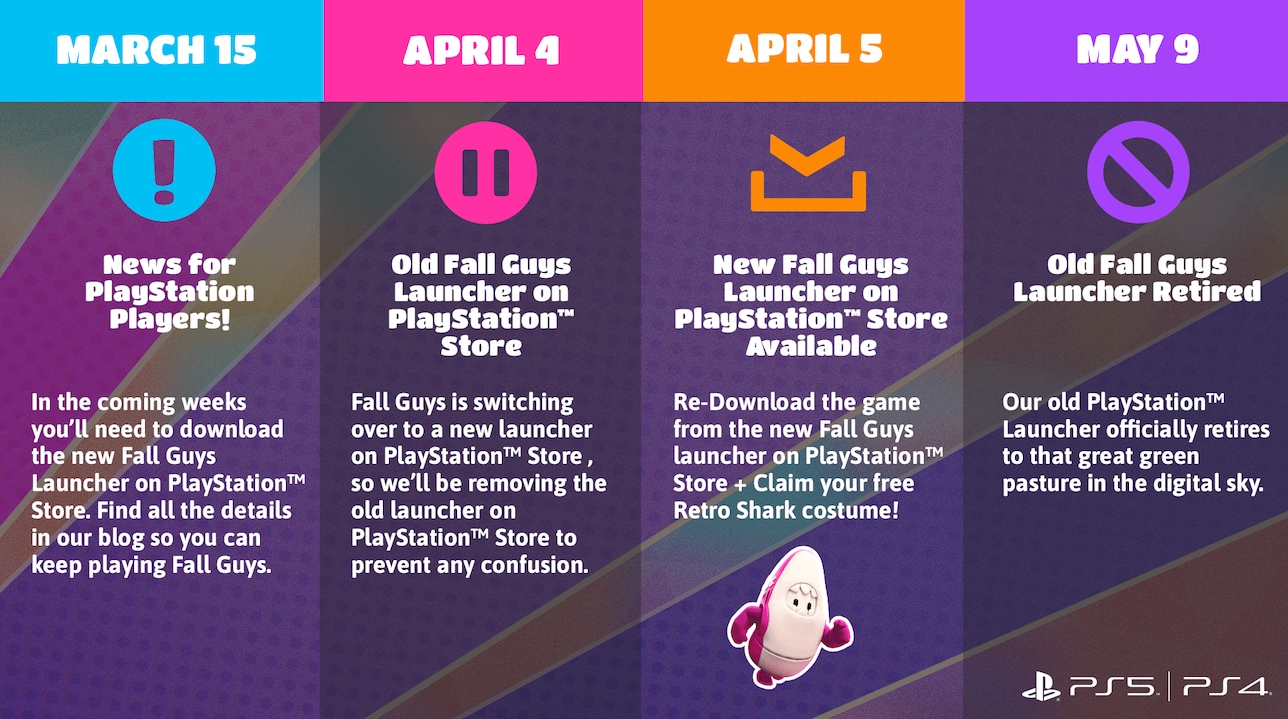
Here’s a timetable of events:
- Starting April 5, the new Fall Guys PlayStation Launcher will be available on the PlayStation Store, and will be required to keep playing if you’re an existing owner of the game.
- If you’re an existing owner of Fall Guys on PS4/5, the new Fall Guys PlayStation Launcher should appear in your Game Library automatically, and all content will transfer. Just hit the PS Library button when it appears!
- Once you’ve downloaded Fall Guys from the new launcher, we encourage you to delete the old one to free up storage space. After April 5, the old launcher icon will be greyed out.
- Claim your free Retro Shark outfit (available until the end of Season 6) through the DLC Store button in the in-game Store page and prepare for the glorious future of Fall Guys by downloading and installing the new launcher from the PlayStation™ Store after April 5.
“We’re hyped to bring you heaploads of new content in 2022, and we’re so grateful to have you all along for the ride,” say Mediatonic.
Fall Guys has been a massive hit for Mediatonic and is currently in Season Six of content. Fall Guys Season 7 will be launched on Tuesday 22nd March 2022. Fall Guys update 1.39 is out now on PS4 and PC and should help those PlayStation players who have been experiencing in-game crashes.
You may also like this additional content from Mediatonic in which they feed a Fall Guys bean to a puppy.
so it shall be https://t.co/cQqVQyvWgJ pic.twitter.com/618QViI26W
— Fall Guys ? (@FallGuysGame) March 13, 2022
Source: Mediatonic



MrYd
Bunch of idiots. They claim “We’re working closely with the good folks at PlayStation to make the process as smooth as possible” while not doing anything of the sort.
Which is easiest? Downloading a new version that seems to exist alongside the existing version, and then deleting the old version? Or having the current version do an update that just happens to download a whole new version? As many other games have done in the past. Which option doesn’t leave 2 separate entries in your library? Maybe they’ve been “working closely with PlayStation” to gain the ability to actually remove things from your library? Which you currently can’t actually do. (Yes, you can hide them)