PlayStation Home Getting Update

Version 1.35 arrives tomorrow.

Published 10/03/2010 at 18:20.
By wotta.
Share |
Related stories (more)
Home is a Success [33]
Honey, I’m Home! [33]
Main Home Spaces get Revamp [23]

Latest Stories (more)
New Medal Of Honor Video Shows Off Choppers [0]
Japanese PSN Store Gets Some Tweaks [8]
‘Outland’ To Be Announced For PSN/XBL [14]

Sony have revealed that PlayStation Home will receive a significant update tomorrow.

Daniel Hill, Home Business Manager for SCEE has revealed via the PlayStation Blog that the latest version, 1.35, will bring huge improvements to the service making it a much slicker and faster experience for all users.

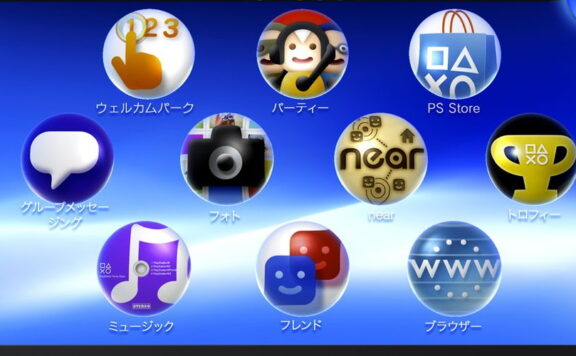
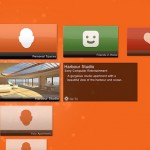
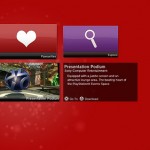
As you can see from the screenshots, the new World Map takes on an almost XMB style look. Sony are hoping that this new menu will  allow you to hook up with your PSN Friends much easier, check out featured spaces and also gain easy access to your favorites and your personal spaces.

This is a welcome addition, especially if it makes the experience a faster and smoother one, as this may even entice people who have tried the service before and disliked it to give it a second chance.

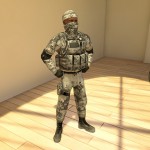
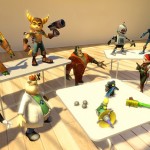
Finally Sony have also revealed that they will be adding some new items to Home this Thursday, these include some nifty Ratchet & Clank figurines and ornaments and a Snow Camouflage outfit from SOCOM.
Comments

Please note that all comments are the opinion and responsibility of the individual author and not TheSixthAxis. You must read and agree to our terms before reading and commenting on this site. User comments are not always moderated by TheSixthAxis.

1 2

  1. I really wish the whole thing was more integrated into the XMB and games, like the NXE and Avatars.


    • Yeah, imagine Buzz with home-people. Do they even have a name? Homies?


      • homos?
        Oh, probably not, right?


      • Make it as fast and smooth as they like, it’s still Turd. If i wanted to walk around and perv on girls… Oh wait i do that every day on the way to work! Seriously though, home just isn’t what it should’ve been. Why can’t my mates come round my flat and check out my trophy collection? Or listen to my music off my hard drive? Or watch the mother on my hard drive? Seriously, it’s rubbish. The only thing it’s good for is a free game of internet chess.


      • Haha. Stupid predictive texting. There is no mother on my hard drive, that’d be plain weird. Clearly that was meant to say movies!


      • That has to be one of the finest predictive text slip-ups ever! :lol: Please remain where are. The police are on their way.


      • I’d probably use Home a lot more if they did what Tony said.


    • Same, I’d much prefer seeing Home avatars instead of what we are shown now. Although I don’t know how well they’d be able to integrate it without losing any of the ‘slickness’ of the XMB.


    • Yeah i said the exact same thing on my comment on the blog. fuck home.


  2. There is a list of update patch notes in the forums.

    1.35 Patch Notes
    New features

    Home Navigator

    * The Home Navigator is a new feature that replaces the World Map.
    * The first thing you will see on the Navigator is a message of the day.
    * The main interface of the Home Navigator has a variety of categories containing all of the different spaces you can visit and methods for getting there.

    Featured spaces

    * This is a regularly changing selection of new and exciting spaces for you to check out.

    Home spaces

    * All of the well known core Home spaces.

    Personal spaces

    * All of the Personal Spaces that you currently own and the Clubs that you belong to.

    Favourites

    * An area to view and manage your favourite spaces.
    * In any other area of the Navigator pressing [SQUARE] adds the currently selected space to your favourites.
    * There is a maximum limit of 20 favourites.

    Friends

    * A list of your friends who are currently in Home, and where they are located.
    * This also includes a head shot picture of what their avatar looks like so you can easily recognise them.
    * If they are in a public space you can go to them.
    * If they are in their own Personal Space you can “knock on the door” and ask to come in.

    Explore

    * The place to browse all of the spaces in Home much like the original World Map.
    * One thing to remember: when using the Navigator, you can press [SQUARE] to add the space you currently have selected as one of your favourites. When are you inside the Favourites category, however, pressing [SQUARE] will remove the selected space from your favourites list.

    Front end

    * The way you log on to Home through the front end has been changed.
    * Once Home has been launched from the XMB there is no need to press any more buttons to log on.
    * The HDD warning message is displayed but no longer requires a button press to confirm.

    * There is no longer a screen requiring a button press to “log on”. Connection to the PSN happens automatically.
    o Fixed a bug that would cause the Menu Pad of one person to become unavailable if two people attempted to sit on the same seat at the same time.

    * If this is the first time you have logged on to Home then you will still have to initially accept the terms of service.
    * Once Home is running you are taken directly to the Home Navigator without loading into any other space first.
    * From the Home Navigator you can choose exactly where you want to go.
    * A lot of the network communication and validation now happens in the background while you are using the Navigator.

    Improvements

    * The time it takes to log on has been improved quite a lot.
    * Relocating between spaces has had many improvements and is a lot quicker.
    * There is a new section for Rewards” on the Menu Pad that contains all of the rewards you have been granted in Home.
    * We have made several improvements to the loading bar.
    * We have increased the frequency of updates about where someone is in Home so that “invite” and “go to” should be more accurate now.
    * Targeting in general has been improved so it should be easier to target various objects of interest to you.
    * Furniture
    * If you place a new item of furniture into a Personal Space with a lot of other furniture already in place it won’t collide with anything until it is in the clear.
    * This will make it easier to add furniture to intricate furniture layouts without knocking anything over.
    * It should also help when placing large items of furniture in your Personal Space.
    * Reduced the wobble that items of furniture could experience when being placed close together.
    * Generally tweaked the physics on furniture items to make them react to each other in a less violent way.

    Changes

    * The position in the world that you listen to sounds from has been changed and should now consistently be the avatar rather than the camera.
    * It is no longer possible to sit down while playing the standing up animation. You must wait for your avatar to completely stand up first.
    * It is once again possible to enter a store while playing a mini-game.
    * If a portable object that takes over the camera is activated while viewing a poster in full screen mode you stop viewing the poster.
    * The inventory section of the Menu Pad is no longer available while sitting down to avoid problems with certain portables being activated in that situation.
    * Some of the pop-up colours have been changed slightly to improve legibility in all of the different places they are used. In addition “Yellow” has been replaced with a “Fiery Orange”.
    * Changed the phrasing of the legend on the furniture removal menu to make it less ambiguous.

    Bug fixes

    * Fixed a bug that would let you join a mini-game while a portable item was out.
    * Fixed a bug that would allow you to interact with a portable item while inside the wardrobe.
    * Fixed a bug that in some circumstances could stop the sound settings from being saved after you change them.
    * Fixed a bug that could cause problems while launching Home if your HDD was completely full.
    * Fixed a bug that could cause the furniture in a Clubhouse to vanish for some people when the club leader entered.
    * Fixed a bug that could occur when previewing male or female clothes in a store without having set up a male or female avatar.
    * Fixed a bug that could cause the download queue to stall when attempting to download certain scenes.
    * Fixed a bug that would allow PSN notification messages to be captured in pictures when using the camera.
    * Fixed a bug that was causing pictures taken with the camera on standard definition televisions to be the wrong aspect ratio.
    * Fixed a bug that would cause a crash when relocating via the Home Safe Screen with a portable item out while in the wardrobe.
    * Fixed a bug in the store that would cause the “Add to basket” button to become permanently unavailable if you pressed Cancel before the item fully loaded.
    * Fixed a bug that was allowing people to join multiple queues at the same time.

    * Fixed a bug that could cause a crash when lots of items of furniture are colliding with one another.
    * Fixed a bug that could cause a crash when loading items in a space.
    * Fixed various bugs within the Pool and Bowling mini-games.

    Apologies if this looks a mess !


    • Oh and a official forum member has made a vid of the new start-up & interface improvements http://www.youtube.com/watch?v=vf1sfjJbotI


      • Wow. It looks good and quicker too. Maybe this’ll warrant a redownload.


      • Yup, definitely going to be checking this out.


      • this looks a lot better than the current start-up. bet that female avatar never lasted long in home square before getting asked “where are you from?”


      • Thanks for the patch list and video… that’s a mighty improvement, just when i was considering deleting Home ! Maybe i won’t after all.


      • Looks like the vid has been made private now by the owner.


    • longest comment ever… yet very informative


      • But will TheSabreman win a prize for it ;-) *readies rosette with TSA logo on it*


    • Thanks for posting that Sabreman, it sounds like this new update addresses a lot of the problems I had with Home – I’ve always said the dominoes world map was rubbish and there were FAR to many screens to click through when you first loaded it up!
      .
      Press a button on your XMB and get a menu saying ‘Where do you want to go?’ is exactly how it should work – I’m surprised it’s taken them this long to address it!
      .
      I’m also interested how the transition between areas has changed too, that big load bar that seemed to pop up in your face every 2 minutes and take ages to load was a really spoilt the experience…
      .
      All they need to do now is to start integrating it into other areas of the PS3 more – more PSN games that make use of your existing Home avatar for example rather than having you create a new avatar for each game – and bundle in that Home-based rewards and game-themed spaces and you can start expanding the reach of Home…


  3. Nice. I hope it is faster. Love the shortcut XMB for the different areas.


    • The reason I stopped using ‘home’ was that it was sooo slooow.


  4. i just want the trophy cabinet/room thing :(


  5. Thank god for this!

    Home has always been far too slow and clunky for me, but the new interface seems to improve on that a great deal. And we even boot to the menu and not to the previous visited space; finally! All I hope for now is more emphasis on the “home” side of things. Sure, I’m glad they’re adding new game spaces, but I wish they’d improve on our homes; they’re rather dull and boring. Some form of music and video would be nice. Also a nightclub type location. Yes there’s Singstar, but that’s so dumbed down it’s hardly worth it.

    But overall, I’m happy with this update :D


  6. Wow, Ratchet figures and an Home update …. best home update ever?


  7. This might make me take another trip into Home, but whether it will make me return again or not is a totally different matter.


  8. Is this what the recent closed beta was for?


  9. I really hope this actually makes Home user-friendly. There’s a lot of very cool content that nobody ever visits because of the horrible loading times.


1 2


Not logged in


Log in to join the TSA Community, see your PS3 Trophies, check your PMs, take part in TSA Meets and earn TSA Points.